
How much do Microsoft Ads cost, and when are they worth adding to Google Ads?
Microsoft Ads charge per click with no minimum fee. How the budget works, who sees the ads, what LinkedIn targeting adds and when to add it to Google Ads.
 By GroundBreaker Media7 min read

Microsoft Advertising charges for each click on a search ad, with no minimum fee and a daily budget you set. Microsoft does not publish an average cost per click, so your bids and your competitors decide the price. It is worth adding once your Google Ads search campaigns already turn a profit and you want more of the same buyers.
How does Microsoft Advertising charge for ads?
Microsoft Advertising, the platform once called Bing Ads, runs an auction each time someone searches. You set a maximum bid, and you pay only when someone clicks; the actual cost can be lower than your bid, depending on competition. Microsoft says the cost per click depends on your bid, the competition and how relevant your ad is (Microsoft Advertising, 2026).
There is no minimum fee. You set a daily budget for each campaign, and ad extensions such as extra links or a phone number cost nothing to add; you pay only for the click (Microsoft Advertising, 2026).
The daily budget is a target, not a hard cap. Microsoft may spend more on a busy day, usually keeping it under twice your daily limit, and balances it over the month (Microsoft Learn, 2025).
Monthly spend limit = daily budget times the number of days in the month.
A $30 daily budget in November can spend up to $900 in the month, even if a single day goes over $30.
Microsoft Ads is one of three search options in our guide to online advertising for small businesses, next to Google Ads search campaigns and Local Services Ads.
How much does a click cost on Microsoft Ads?
Microsoft does not publish an average cost per click, and third-party benchmarks disagree because they average very different industries. The reliable number is your own. Microsoft Advertising’s Keyword Planner, free inside any account, gives search volume and cost estimates for the keywords you plan to buy (Microsoft Advertising, 2026).
Start from what you already know. If your Google Ads account shows what you pay per click for a keyword, use that as the first bid in Microsoft Ads and adjust after two to four weeks of real data. For how to turn a cost per click into a monthly budget, our Google Ads budget guide works through the math, and the same method applies here.

Who sees Microsoft Ads?
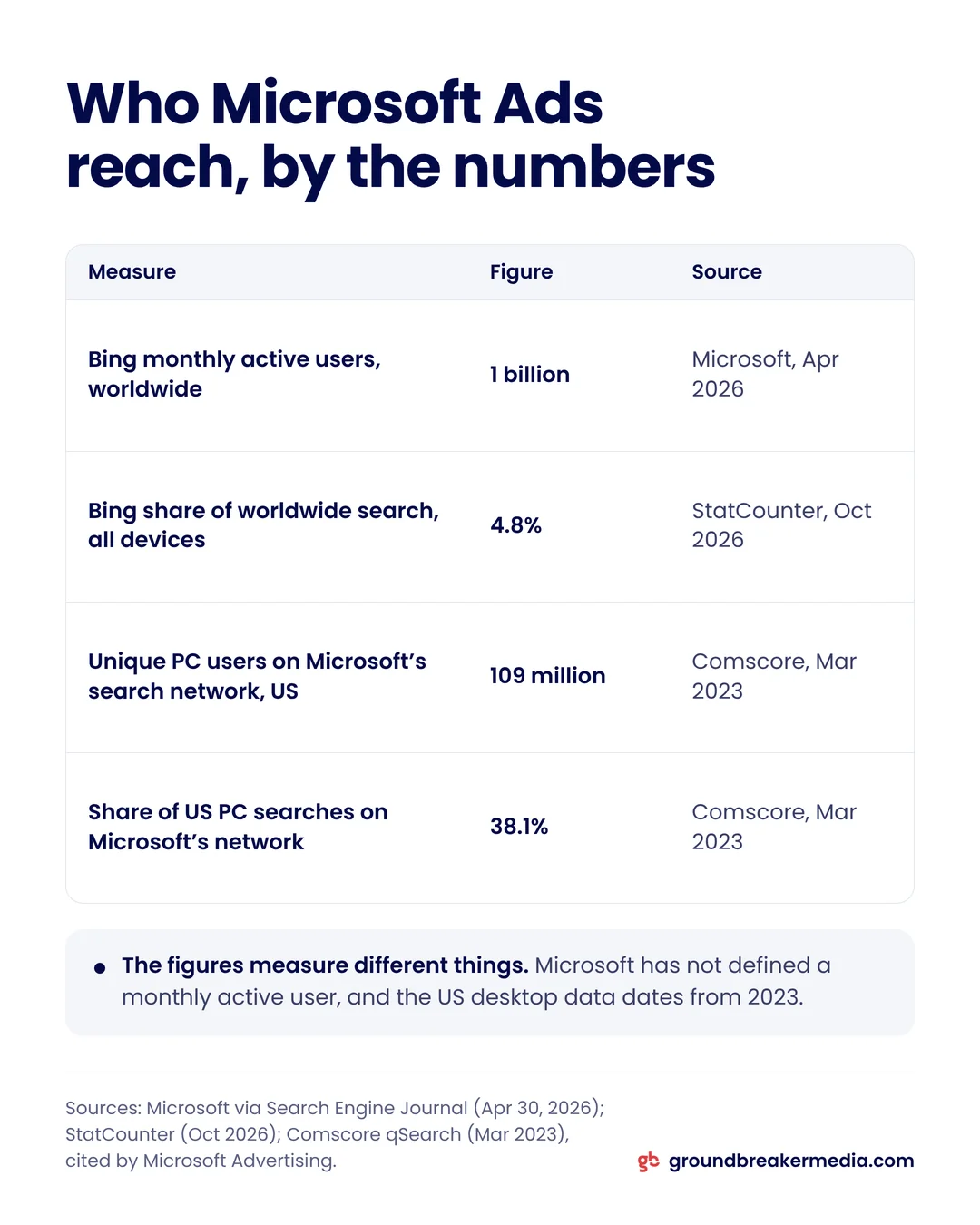
Microsoft’s search ads appear with results on Bing, AOL, Yahoo, DuckDuckGo, Ecosia and other partner sites. Its audience ads appear on MSN, Microsoft Start, Microsoft Edge and Outlook.com (Microsoft Learn, June 2026). Your ad distribution setting decides whether search ads run across the whole network or only on Microsoft’s own sites and select traffic.
| Measure | Figure | Source and date |
|---|---|---|
| Bing monthly active users, worldwide | 1 billion | Microsoft, earnings call, April 2026 |
| Bing share of worldwide search, all devices | 4.8% | StatCounter, October 2026 |
| Unique PC users on Microsoft’s search network, US | 109 million | Comscore, March 2023, cited by Microsoft |
| Share of US PC searches on Microsoft’s network | 38.1% | Comscore, March 2023, cited by Microsoft |
The figures measure different things. Microsoft has not said how it counts a monthly active user, and its US desktop figures date from 2023. Read together, they show Microsoft as a small share of search overall and a larger share on desktop computers.
What can Microsoft Ads target that Google Ads cannot?
Microsoft Ads can target people by their LinkedIn profile: the company they work for, their industry and their job function. Microsoft says it is the only ad platform apart from LinkedIn itself that offers this (Microsoft Learn, July 2026).
It works as a bid adjustment, not a filter. Your ads still show to everyone who searches your keywords, and you bid more for the people who match the profile you care about, for example purchasing managers in manufacturing. You can list up to 1,000 companies per ad group or campaign, and the targeting is available on Search, Dynamic Search Ads, Shopping, Audience and Performance Max campaigns.
For a business that sells to other businesses, this is the main reason to try Microsoft Ads. The same keyword can come from a student and from a buyer, and LinkedIn data lets you pay more for the buyer.

How do you import Google Ads campaigns into Microsoft Ads?
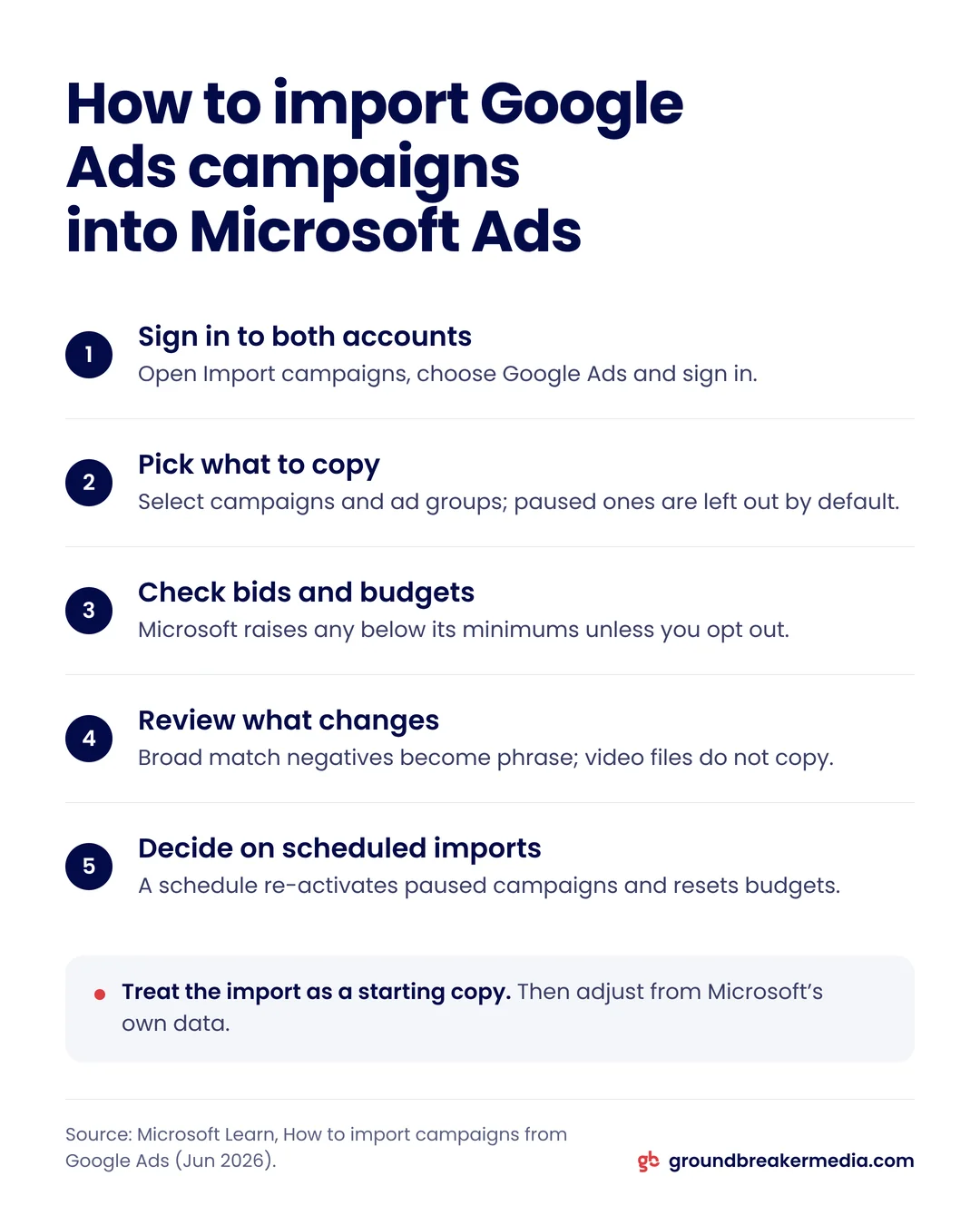
Microsoft Ads can copy campaigns straight from Google Ads with its Google Import tool, so you do not rebuild keywords, ads and extensions by hand. Import up to 10 Google Ads accounts at once (Microsoft Learn, June 2026).
- Sign in to both accounts. In Microsoft Advertising, open Import campaigns, choose Google Ads and sign in with the Google account that manages your ads.
- Pick what to copy. Select the campaigns and ad groups. Paused ad groups are left out unless you choose to include them.
- Check bids and budgets. By default Microsoft raises any bid or budget below its minimums. You can opt out, but campaigns below the minimums will not import.
- Review what changes. Broad match negative keywords become phrase match negatives, and video files from Video campaigns do not copy.
- Decide on scheduled imports. A schedule keeps copying changes from Google Ads, and it re-activates paused campaigns and resets budgets to the Google settings. Turn it off once you start managing the two accounts separately.
Microsoft itself warns that settings that work in one platform are unlikely to suit the other, and it scores ad quality its own way. Treat the import as a starting copy, then adjust bids, devices and audiences from Microsoft’s own data.
How do you track conversions in Microsoft Ads?
Microsoft Ads tracks conversions with its own tag, Universal Event Tracking, usually called the UET tag. You install it on every page of your site, then create conversion goals for the actions that matter, such as a form submission or a booked call (Microsoft Learn, June 2026). The tag is needed even if you imported your campaigns from Google Ads, and it has to be in place before you judge any results.
As with any ad platform, the clicks that matter are the ones that turn into customers. Send closed deals back from your CRM where you can, the method our guide to ad platform and CRM revenue explains.
When are Microsoft Ads worth it?
Microsoft Ads are worth testing when three things are true: your Google Ads search campaigns already bring customers at a cost you accept, you have bought most of the searches available to you on Google, and your buyers search from work computers. Business-to-business services, professional services and higher-priced purchases researched at a desk fit that profile best.
They are not worth it yet if your Google Ads account is still unproven, because the same weaknesses will copy across, or if your budget is so small that splitting it leaves neither account with enough clicks to learn from.
A fair test runs 60 to 90 days on its own budget, with the UET tag in place from day one. Judge it on cost per lead and cost per customer, the measures our guide to marketing reports defines, not on cheaper clicks.
GroundBreaker Media manages Microsoft Ads inside one paid media fee alongside Google, Meta and the other platforms, so adding it does not add a separate retainer.
Frequently asked questions
Is Bing Ads the same as Microsoft Advertising?
Yes. Microsoft renamed Bing Ads to Microsoft Advertising in April 2019, and many people still use the old name. The account, the auction and the ad formats are the same product under the newer name, which is often shortened to Microsoft Ads. Its search ads still run mainly on Bing and partner search engines.
Do Microsoft Ads show on DuckDuckGo and Yahoo?
Yes. Microsoft’s search network serves ads alongside results on Bing, AOL, Yahoo, DuckDuckGo, Ecosia and other partner sites. Your ad distribution setting controls this: you can show ads across the whole network, or only on Microsoft’s own sites and select traffic, which is a common choice while you test lead quality.
Does Microsoft Ads use the same Quality Score as Google Ads?
No. Microsoft calculates quality in its own way, and it warns that settings that work in Google Ads are unlikely to be right for Microsoft Advertising. An imported campaign starts with Google’s structure but builds its own quality history, so expect to adjust bids and ads during the first weeks.
Can a small budget work on Microsoft Ads?
Yes, there is no minimum fee, and you can start with a small daily budget. The limit is learning speed: a campaign needs enough clicks and conversions to show what works. If your total budget is small, put it into one platform first and add Microsoft Ads once that platform is profitable.
Written by
GroundBreaker Media
A performance marketing agency that connects what you spend to what it brings back. About us
Related insights
All insights


Want one version of the truth? Start with a free audit.
Answer 10 quick questions and get a written audit within 2 business days: what your marketing is producing, what's holding it back, and what to fix first.