
Why your ad platform and your CRM disagree on revenue
Ad platforms count tracked actions on the click date and credit their own ads, while your CRM counts each closed deal once. Trust the CRM for revenue.
 By GroundBreaker Media6 min read

When Google Ads and Meta claim more sales than your CRM closed, they count different things on different clocks. Each platform counts actions linked to its own ads, inside its own attribution window, so one sale can be claimed twice. Your CRM records each deal once, on the day it closes, so trust it for revenue.
Why does Google Ads report more conversions than my CRM?
Google Ads usually counts lead actions such as form fills and calls, not closed deals, and it can count more than one action per click. Your CRM counts the deals your team marks as won.
A Google Ads conversion is whatever action the account is set to track, often a form submission or a qualifying call. Many of those leads never buy.
Counting settings widen the gap. Google’s help page on understanding conversion tracking data explains that an action can count every conversion after an interaction or only one, and it recommends "One" for leads to prevent duplicate counts from page refreshes. The "All conversions" column adds more: Google’s documentation says it includes secondary actions, store visits and certain phone calls on top of the Conversions column.
Why do the dates in each system never line up?
Google Ads assigns a conversion to the day of the ad click. A CRM records a deal on the day it closes, so a March click that closes in May sits in two different months.
Google’s article on conversions by time says Google Ads "has always reported conversions by the date your ad was clicked," which keeps conversions aligned with spend. With a long sales cycle, last month’s ad report keeps gaining conversions after the month ends, while the CRM books revenue from campaigns that ran a quarter ago.
How do attribution windows and models change the count?
Each platform decides how long after an ad interaction it still takes credit and how it splits that credit between ads. Longer windows and credit for views produce larger numbers.
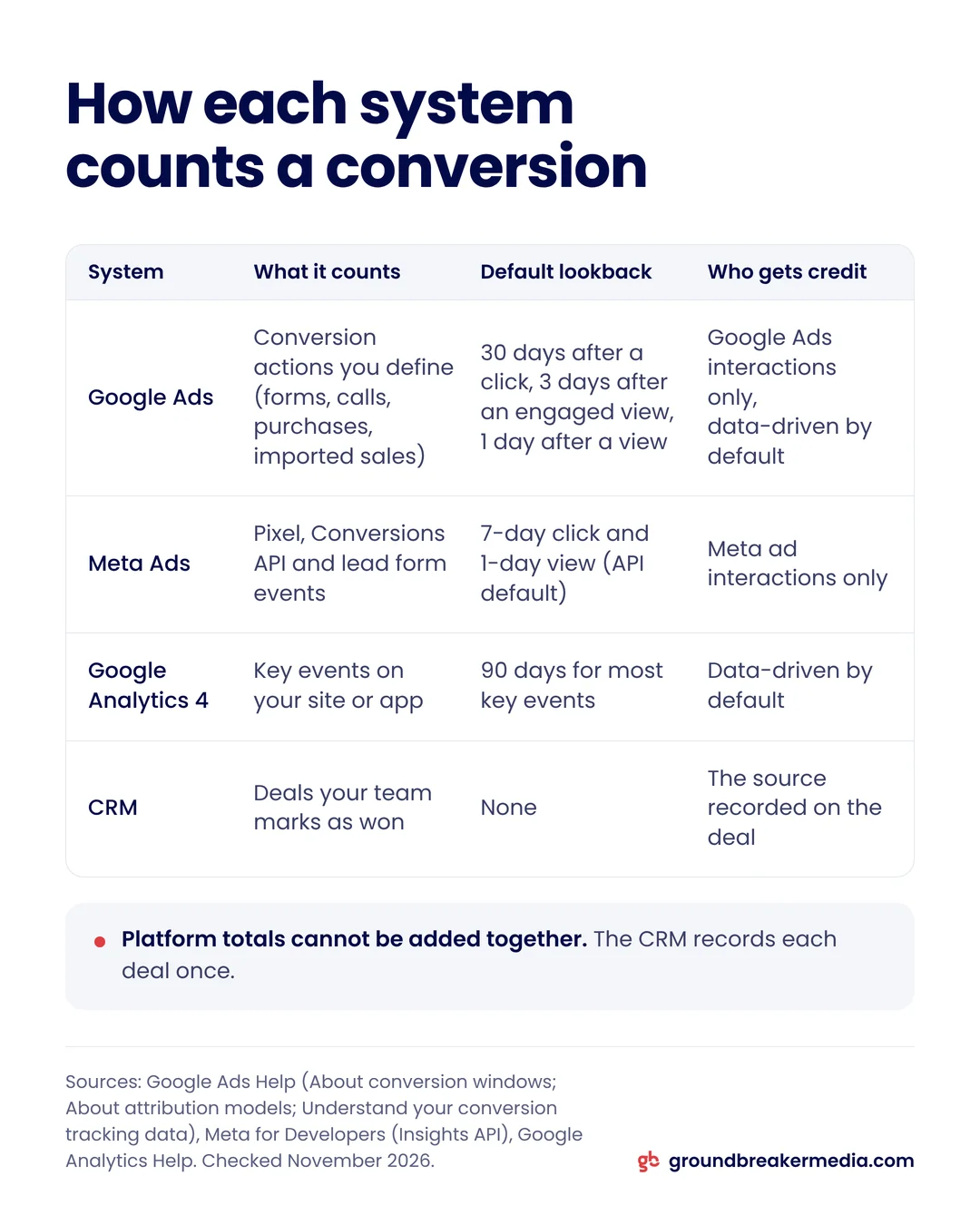
Google Ads uses a 30-day click-through conversion window by default, adjustable up to 90 days depending on the conversion source, and Google’s page on attribution models states that data-driven attribution is the default for most conversion actions. Meta’s Insights API documentation lists 7-day click and 1-day view as its default attribution value. In March 2026 Meta also narrowed click-through attribution to link clicks and moved conversions after shares, saves and similar actions into a new engage-through category, according to PPC Land’s coverage of the change. Google Analytics defaults to a 90-day conversion window for most key events.
| System | What it counts | Default lookback | Who gets credit |
|---|---|---|---|
| Google Ads | Conversion actions you define: forms, calls, purchases, imported sales | 30 days after a click, 3 days after an engaged view, 1 day after a view | Google Ads interactions only, data-driven by default |
| Meta Ads | Pixel, Conversions API and lead form events | 7-day click and 1-day view (API default) | Meta ad interactions only |
| Google Analytics 4 | Key events on your site or app | 90 days for most key events | Data-driven by default |
| CRM | Deals your team marks as won | None | The source recorded on the deal |
Why do Google and Meta both claim the same sale?
Each platform sees only its own ads, so each one credits itself when a buyer touched its ad inside its window. Added together, platform totals can exceed the real number of sales.
Picture a buyer who sees a Meta ad in the morning without clicking, then clicks a Google ad that afternoon and fills in the form. Meta can count the lead under its 1-day view window, Google Ads counts a click conversion, and your CRM records one lead. Google describes its own reporting as using "ad-centric models" in its conversion tracking help, and says discrepancies "often up to 20%" are expected even between Google Ads and Google Analytics.
What happens when CRM sales never reach the platforms?
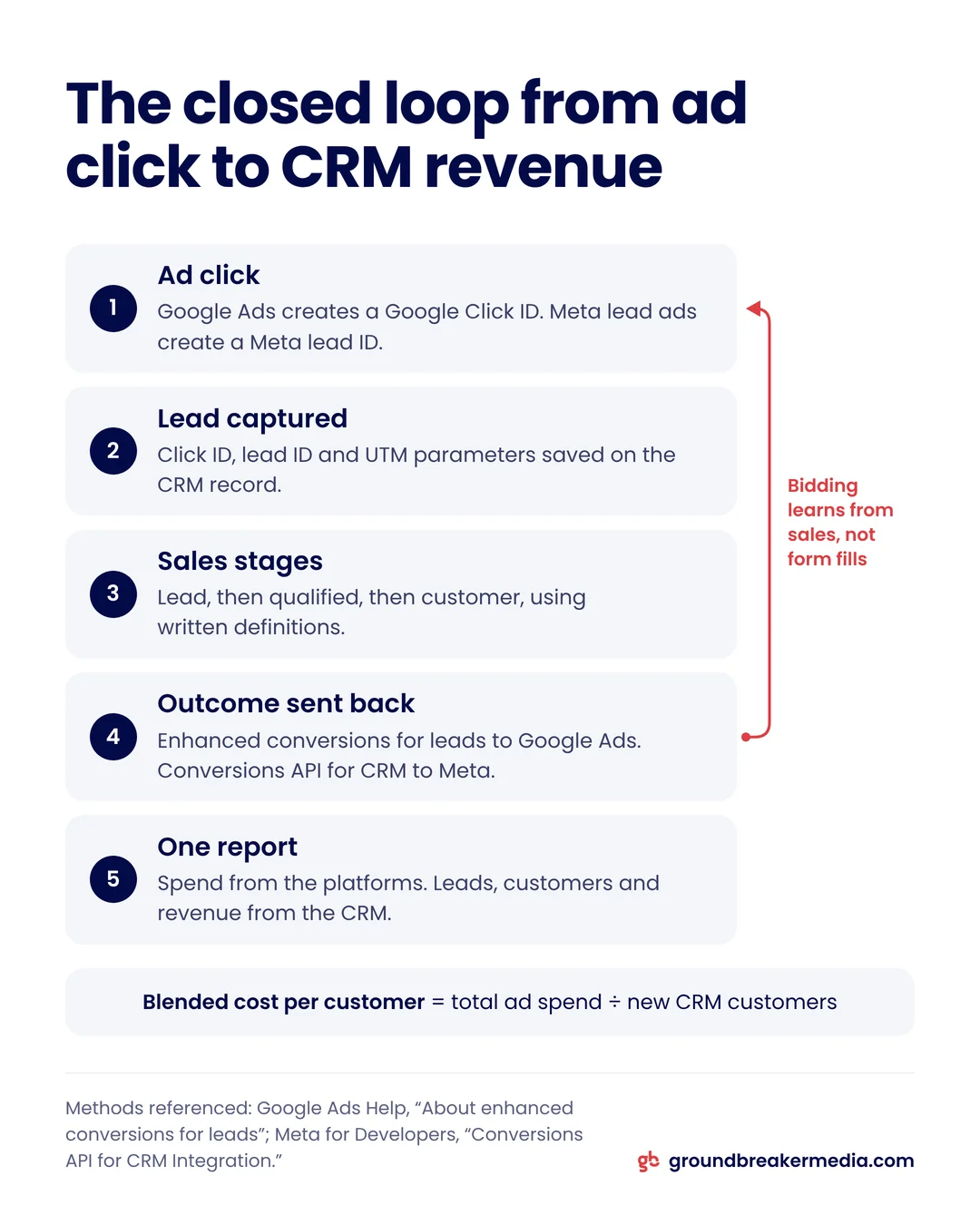
The platforms optimize toward the cheapest form fills rather than the leads that buy, because they never learn which leads closed. Importing CRM outcomes closes that loop.
Closed-loop tracking: sending each lead’s outcome from your CRM back to the ad platform that produced the lead, so bidding learns which leads became customers.
Google now recommends enhanced conversions for leads for this: your site sends Google a hashed version of the email the lead typed in, and when the sale closes you upload the outcome, which Google matches back to the ad. Its offline conversion imports help tells new advertisers to start with enhanced conversions for leads instead of the older click ID import, tells current users to upgrade, and points both to Google Ads Data Manager for the setup. Google reports that advertisers who combined hashed first-party data with click IDs saw a median 10% increase in conversions compared with standard offline imports. Meta’s Conversions API for CRM integration does the same for lead ads, and Meta says optimizing to CRM stages "may yield higher quality leads that are more likely to convert."
Under Revenue Infrastructure, GroundBreaker Media sets up this loop for clients.
Which number should I trust?
Trust the CRM for customers and revenue. Use platform numbers to compare campaigns, keywords and audiences inside each platform.
Blended cost per customer = total ad spend across all platforms ÷ new customers recorded in the CRM
Blended return on ad spend = CRM revenue from new customers ÷ total ad spend across all platforms
The other figures worth a monthly look are in the five-minute report checklist.
How do I get one version of the truth?
Capture the source on every lead, keep it attached to the deal until it closes, send outcomes back to the platforms and report revenue from the CRM.
- Store the Google Click ID, the Meta lead ID for lead ads and the UTM parameters on each CRM record the moment the lead arrives.
- Define a lead, a qualified lead and a customer in writing, and use the same definitions in every report.
- Send qualified and won stages back to Google Ads and Meta so bidding learns from sales.
- Count leads once per interaction.
- Take spend from the platforms and everything after the lead from the CRM.
Some gap will remain, because browsers and consent rules stop some clicks from being matched, a limit that the privacy-proof tracking guide covers in detail.
Frequently asked questions
Is it normal for Google Ads and my CRM to show different numbers?
Yes. Google Ads counts tracked actions such as form fills and calls on the date of the ad click, inside a 30-day default click window, and credits only Google ads. A CRM counts closed deals on the date they close. A large or growing gap is worth investigating, starting with counting settings and CRM outcomes that never reach Google Ads.
Should I switch Google Ads to last-click attribution to match my CRM?
Usually not. Last click is still available in Google Ads alongside data-driven, but switching does not let Google Ads see your other channels or your closed deals. The better fix is sending CRM outcomes back through enhanced conversions for leads and reporting revenue from the CRM.
Can I add Google Ads and Meta conversions together?
No. Each platform credits itself for conversions that follow its own ads within its window, so a buyer who saw a Meta ad and later clicked a Google ad can be counted by both. Adding the totals double counts those buyers. Use the CRM for total leads, customers and revenue.
How long do imported offline conversions take to show in Google Ads?
Google’s help for file imports says data can take 24 to 48 hours to process fully, and conversions within one day of the click may not be recorded yet. Imported conversions are reported on the date of the original ad click, so they fill in earlier periods rather than the upload day.
Written by
GroundBreaker Media
A performance marketing agency that connects what you spend to what it brings back. About us
Related insights
All insights


Want one version of the truth? Let's look at your numbers.
A short call, an honest read on what your marketing is producing, and clear next steps.