
Claude Sheets, Whiteboards and Data: what a marketing team can do with them
Claude Sheets and Whiteboards launched in beta and Claude Data went live on Nov 10, 2026. What each does for marketing, which plans include it, its limits.
 By GroundBreaker Media7 min read

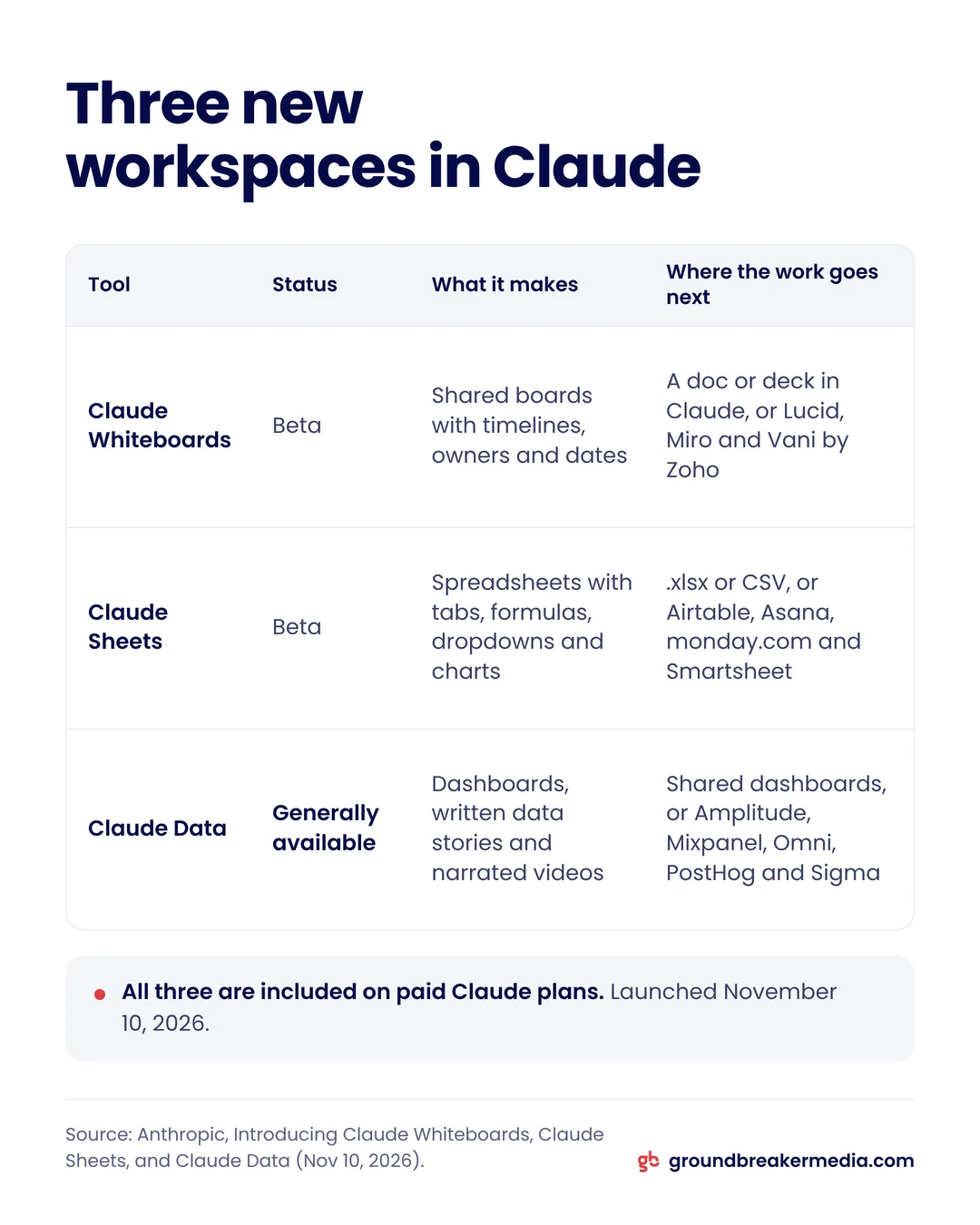
Anthropic added three workspaces to Claude on November 10, 2026: Claude Whiteboards and Claude Sheets in beta, and Claude Data, the renamed Claude Dashboards, now generally available. All three come with every paid Claude plan. For a marketing team they cover planning, tracking and reporting, each with limits worth knowing before you move work into them.
What did Anthropic launch on November 10, 2026?
Anthropic launched three artifact types that a team builds together with Claude: a whiteboard for planning, a spreadsheet for tracking and a data workspace for dashboards and reports (Anthropic, November 2026). An artifact is a file Claude creates inside a chat that you can keep editing, share with colleagues and open again later.
| Tool | Status | What it makes | Where the work goes next |
|---|---|---|---|
| Claude Whiteboards | Beta | Shared boards with timelines, owners and dates | A doc or deck in Claude, or Lucid, Miro and Vani by Zoho |
| Claude Sheets | Beta | Spreadsheets with tabs, formulas, dropdowns and charts | .xlsx or CSV export, or Airtable, Asana, monday.com and Smartsheet |
| Claude Data | Generally available | Dashboards, written data stories and narrated videos | Shared dashboards, or Amplitude, Mixpanel, Omni, PostHog and Sigma |
The same day, Anthropic let partner apps open inside Claude as full apps beside the chat. The first group includes Adobe, Asana, Canva, HubSpot, monday.com, Notion and Webflow, and Claude’s changes appear in the app as it makes them (Anthropic, November 2026). Anthropic also said Claude Meetings, which joins a call to take notes, is coming soon.
What is Claude Sheets, and what can it build for marketing?
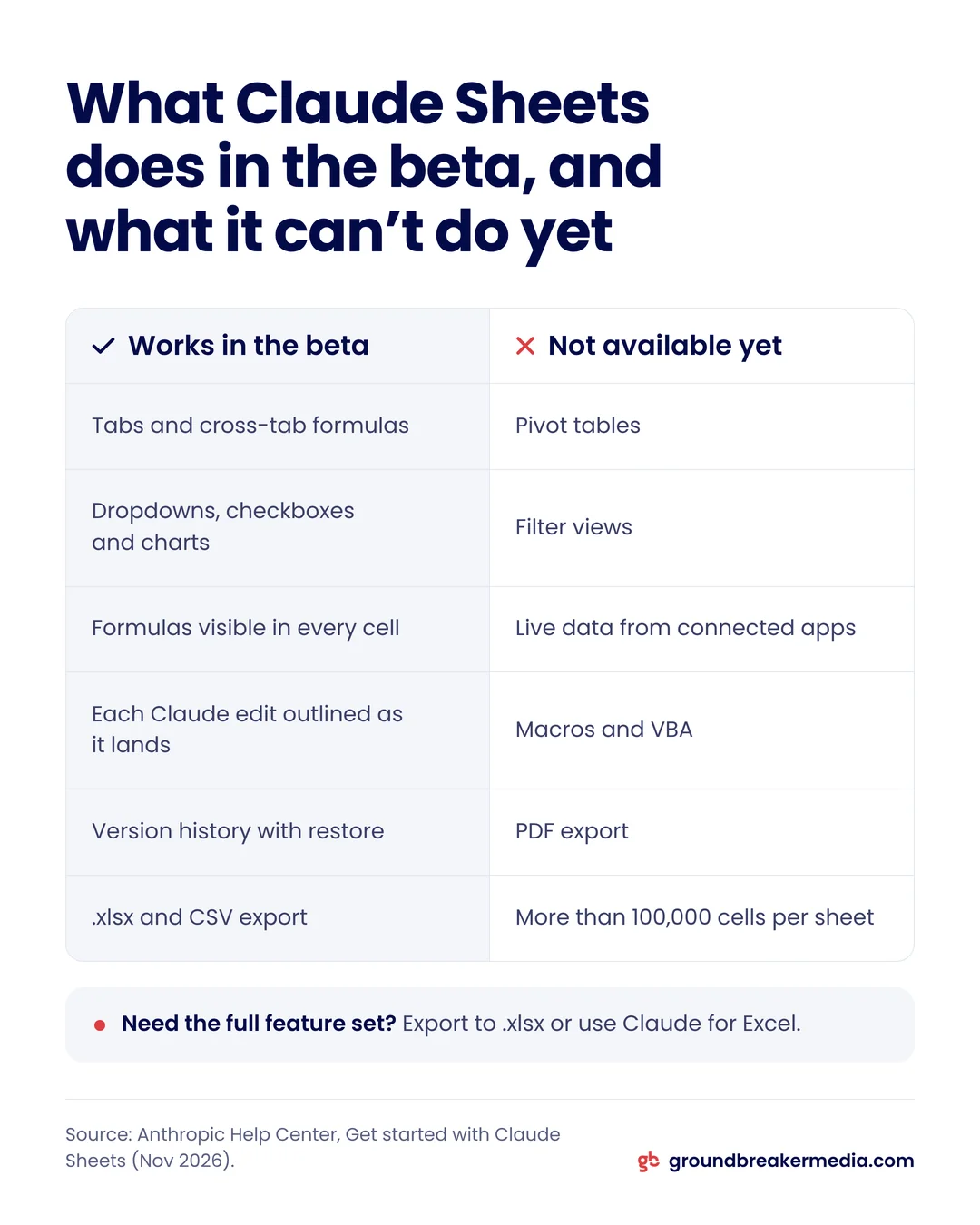
Claude Sheets is a spreadsheet inside Claude that you, your team and Claude edit in the same cells. You describe what you need, such as a campaign tracker or a content calendar, and Claude builds it with tabs, cross-tab formulas, conditional formatting, dropdowns, checkboxes and bar, line or pie charts (Anthropic Help Center, November 2026).
Three details make it practical for shared marketing work. Formulas stay visible in the cells, so anyone can check how a total was calculated. Claude outlines each cell it changes as the edit lands. And version history can restore an earlier version, which also removes every edit made after it.
A sheet holds up to 100,000 cells in the beta. Before you import a year of lead data, check how many rows fit:
Rows that fit in one Claude sheet = 100,000 cells divided by the number of columns.
A 20-column lead log fits 5,000 rows; a 50-column export from an ad platform fits 2,000. Larger files belong in Excel or Google Sheets, where Claude for Excel and Claude for Google Workspace work on the file you already have.
What is Claude Whiteboards used for?
Claude Whiteboards is a shared board where a team brainstorms and Claude turns the notes into a plan with a timeline, owners and dates (Anthropic, November 2026). Teammates work on the board at the same time.
For marketing, the board fits the messy stage before a campaign: listing offers, audiences and channels, then asking Claude to group them by theme. Anthropic’s own example is a retrospective, where Claude sorts sticky notes by theme and drafts action items for each person. You can drag a box around one part of the board and ask Claude about only that part, which works well for questioning one channel’s plan without rewriting the rest.
A finished board becomes a document or a slide deck in Claude, or moves to Lucid, Miro or Vani by Zoho if your team already plans there.

What does Claude Data add to Claude Dashboards?
Claude Data adds governance and sharing to Claude Dashboards, which launched in beta in October 2026 and was renamed because it now does more than dashboards (Anthropic, November 2026). For each chart, Claude writes a SQL query, runs it against your data source and shows the query and the time of the last refresh (Anthropic Help Center, 2026).
The additions that matter for reporting to a client or an owner:
- Certified metric definitions (beta): a data team approves a query, and every chart built on it shows a certified badge.
- Live sharing (beta): viewers see current numbers without access to the connector, and can run only the approved queries.
- Data stories: Claude drafts a written story or a narrated video from the numbers, for review before anyone shares it.
- Caching and tracked changes: each dashboard refreshes on its own schedule, and edits show who made them, with rollback to an earlier version.
Claude Data needs a data connector, such as a warehouse or a CRM. Anthropic names Amazon Redshift, BigQuery, ClickHouse, Databricks, Snowflake and Salesforce. A dashboard is only as useful as the metrics on it, and our guide to marketing dashboards sets out what a marketing dashboard should show.
Which plans include Claude Sheets, Whiteboards and Data?
All three are included on every paid Claude plan, and none has a separate price. Use counts toward the plan’s usage limits (Anthropic Help Center, November 2026).
| Plan | Price, billed monthly | Default setting |
|---|---|---|
| Pro | $20 per month | Available |
| Max | $100 per month | Available |
| Team, Standard seat | $25 per seat per month | On by default |
| Enterprise | $20 per seat per month, billed annually, plus usage | Sheets and Whiteboards off; Data on from November 19, 2026 |
Prices are in US dollars from Anthropic’s pricing page in November 2026; Pro costs $17 a month billed annually, and a Team Standard seat $20. Enterprise and Team admins turn each tool on or off in Organization settings, under Artifacts. Anthropic says all three work on the web, desktop and mobile apps, although its help center lists only basic read-only access to sheets on mobile during the beta.
How can a small marketing team use them together?
The three tools work as one chain: plan on a board, track in a sheet, report from data. A small team running a quarterly campaign could use them in this order.
- Plan the campaign on a whiteboard. List offers, audiences, channels and deadlines, then ask Claude to turn the board into a timeline with an owner for each task.
- Build the tracker in a sheet. Ask for one tab per channel, with dropdowns for status, a budget column and a formula for spend to date.
- Share the sheet with the team. Each person updates their rows, and Claude outlines its own edits so nobody loses track of what changed.
- Report from Claude Data. If your ad and CRM data sits in a warehouse, ask for a dashboard of spend, leads and customers by channel.
- Hand off where needed. Export the sheet to .xlsx for finance, or send the board to Miro if an agency partner plans there.
Step 4 is where most small businesses stop. Claude Data needs a connector to a data source, so ad results that live only inside the Google Ads and Meta interfaces first have to reach a source Claude can read. Google’s BigQuery Data Transfer Service can load Google Ads data into BigQuery on a schedule, and standard Google Analytics 4 properties can export events to BigQuery up to 1 million a day (Google, 2026). That pipeline is the setup work behind a live dashboard.

What can’t Claude Sheets and Claude Data do yet?
Claude Sheets cannot pull live data from connected apps, so a tracker shows what you or Claude typed or imported, not current ad results (Anthropic Help Center, November 2026). Docs, decks and dashboards also cannot use a sheet as their data source.
The beta also leaves out pivot tables, protected ranges, find and replace, multi-column sort, filter views, multi-select dropdowns and PDF export, and it does not support macros, VBA, Power Query or DAX. For clinics and other businesses that handle patient data, Claude Sheets does not yet support HIPAA, customer-managed encryption keys or zero data retention, so keep patient records out of it.
Claude Data has its own limit: certified queries and live sharing are still in beta. Until certified definitions are in place, two people can ask the same question and get charts built on different queries.
Should a marketing team move its reporting into Claude?
Move the planning and the light tracking now, and treat Claude Data as a report layer on top of systems you already trust. A whiteboard and a shared tracker replace scattered notes and email threads with little risk, because both export when you outgrow them.
Reporting is different. Ad platforms and your CRM count conversions on different dates and rules, which our guide to ad platform and CRM revenue explains, and a dashboard inherits whichever count its query reads. Certify the queries for leads, customers and revenue first, then share. Connecting ad accounts and the CRM into one report people trust is the core of GroundBreaker Media’s Revenue Infrastructure work.
Frequently asked questions
Can Claude Sheets replace Excel or Google Sheets?
Not yet for heavy work. Claude Sheets handles shared trackers, budgets and calendars with formulas and charts, but the beta caps a sheet at 100,000 cells and has no pivot tables, macros or filter views. Anthropic suggests exporting to .xlsx or CSV, or using Claude for Excel, when you need the full feature set.
Can Claude Data report on Google Ads and GA4?
Only through a data source Claude can connect to. Claude Data reads warehouses such as BigQuery and apps such as Salesforce. Google Ads data can load into BigQuery through Google’s transfer service, and GA4 can export events there, so a BigQuery project connected to Claude can feed a Google Ads and GA4 dashboard.
Who can see a shared Claude Data dashboard?
Only the people you share it with. Dashboards start private. With live sharing, which is in beta, viewers see current numbers without access to the underlying connector, and they can run only the queries the owner approved. They cannot run new queries with the owner’s access to the data.
Do Claude Sheets and Whiteboards cost extra?
No. They are included on paid Claude plans at no separate price, from Pro at $20 a month. Sheets and dashboards count toward your plan’s usage limits, so heavy use reaches those limits sooner. On Enterprise plans, an admin has to turn Sheets and Whiteboards on first.
Written by
GroundBreaker Media
A performance marketing agency that connects what you spend to what it brings back. About us
Related insights
All insights


Want one version of the truth? Let's look at your numbers.
A short call, an honest read on what your marketing is producing, and clear next steps.