
Marketing analytics for small businesses: tracking, attribution and reporting
How a small business tracks leads and calls, credits each ad platform and reports from its CRM, so every ad dollar ties back to customers and revenue.
 By GroundBreaker Media17 min read

Marketing analytics answers one question for a small business: which ad dollars turned into customers. It joins three sources, the ad platforms for spend, Google Analytics 4 (GA4) for site visits and the CRM for leads, sales and revenue. Report results from the CRM, because each ad platform counts only what its own ads touched.
What should a small business measure in its marketing?
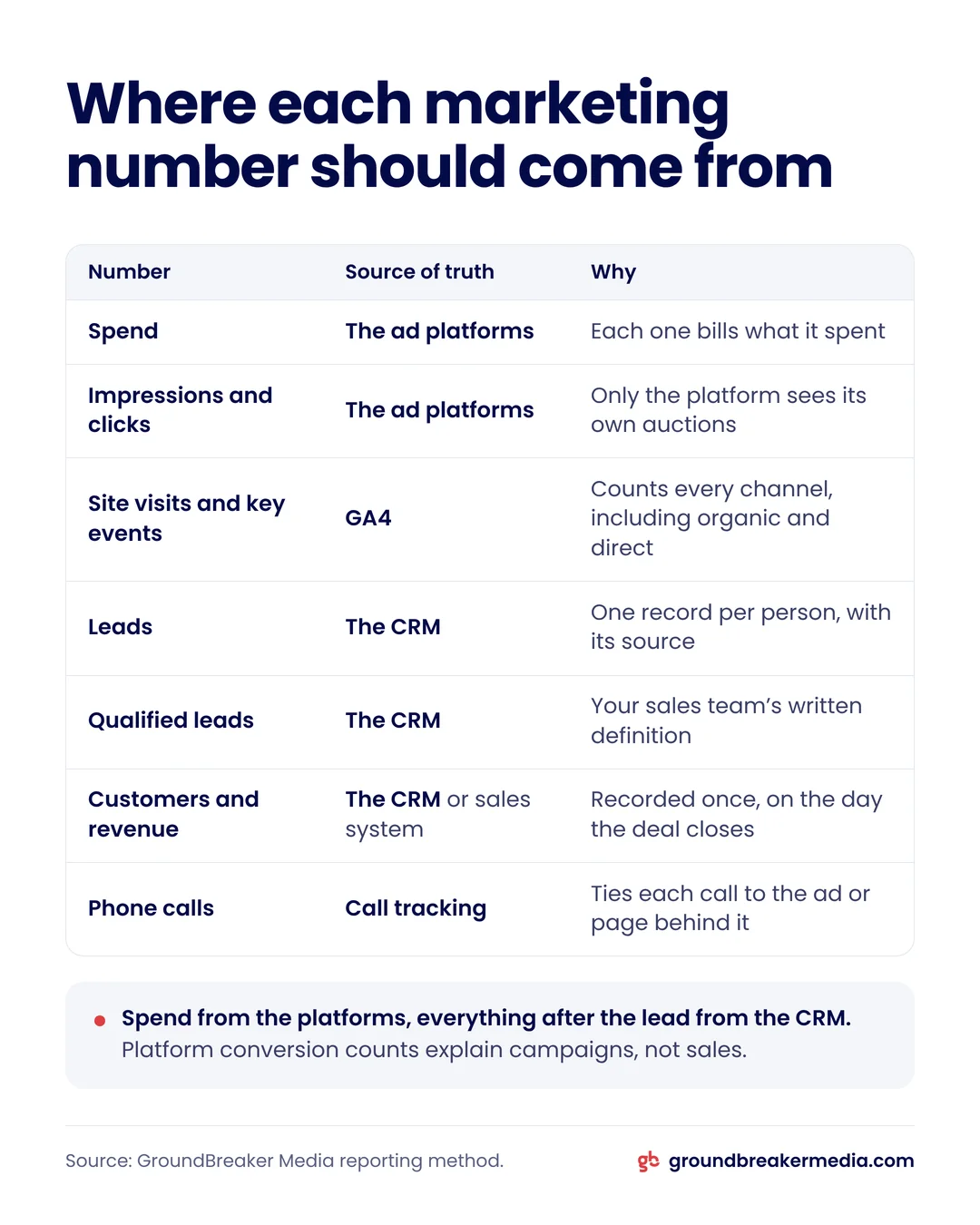
Measure the chain from spend to revenue: what you spent, the leads it produced, how many of them qualified, how many became customers and what those customers paid. Every other number in an ad account helps explain that chain.
Marketing analytics is the practice of collecting, joining and reading marketing data so you can see which spending produced customers. For most small businesses it rests on three systems, and each one is the authority on a different part of the chain:
- The ad platforms (Google Ads, Microsoft Advertising, Meta, LinkedIn, TikTok, Reddit) know what you paid and what happened inside their own auctions. Their costs and fit are compared in online advertising for small businesses.
- GA4 knows what visitors did on your website, whichever channel brought them, including organic search and direct visits.
- The CRM (customer relationship management system) knows who became a lead, who qualified, who bought and for how much.
Trouble starts when a number is taken from the wrong system. An ad platform’s "conversions" column usually counts form fills and calls credited to its own ads, so it cannot tell you how many customers you won. A CRM cannot tell you what a click cost. Assign each number to the system that is built to know it, and most arguments about "which report is right" end before they start.
Phone calls and organic search add two more sources once they carry real volume: call tracking for calls, and Google Search Console for the queries that bring unpaid visits. The rest of this guide covers how to collect each number cleanly, how the platforms divide credit, and how to report it. For the monthly read itself, how to read a marketing report sets out the eight numbers in order.
Which marketing metrics and KPIs matter most?
Cost per customer and return on ad spend matter most, because they connect spend to sales. Cost per lead and qualified rate matter next, because they explain why either of the first two moved.
A key performance indicator (KPI) is a number you have agreed to judge marketing by, with a target attached. Plenty of metrics describe an ad account; only a few deserve a target. For a business that sells through leads, the useful set runs from spend to leads, cost per lead, qualified rate, customers, cost per customer, revenue and return.
Cost per lead is the most quoted and the most misleading of these, because it rewards volume rather than buyers. Example (hypothetical numbers): two campaigns each spend $2,000 in a month. Campaign A brings 80 leads at $25 each and 4 customers, so each customer costs $500. Campaign B brings 40 leads at $50 each and 8 customers, so each customer costs $250. Judged on cost per lead, campaign A wins. Judged on cost per customer, campaign B costs half as much per sale, and B is the campaign to fund. The highest cost per lead your margins can carry is a separate calculation, worked through in what a good cost per lead is.
Return on ad spend (ROAS) divides revenue by ad spend. Return on investment (ROI) subtracts all costs first, including agency fees, creative and tools, so it shows whether the business made money. A campaign can post a strong ROAS on a low-margin product and still lose money, which is why ROI belongs in the owner’s report and ROAS belongs in the ad account.
Impressions, click-through rate and engagement are diagnostic metrics. They help the people running the ads find a problem once one of the main numbers moves, but none of them says whether the money came back.
How does conversion tracking work?
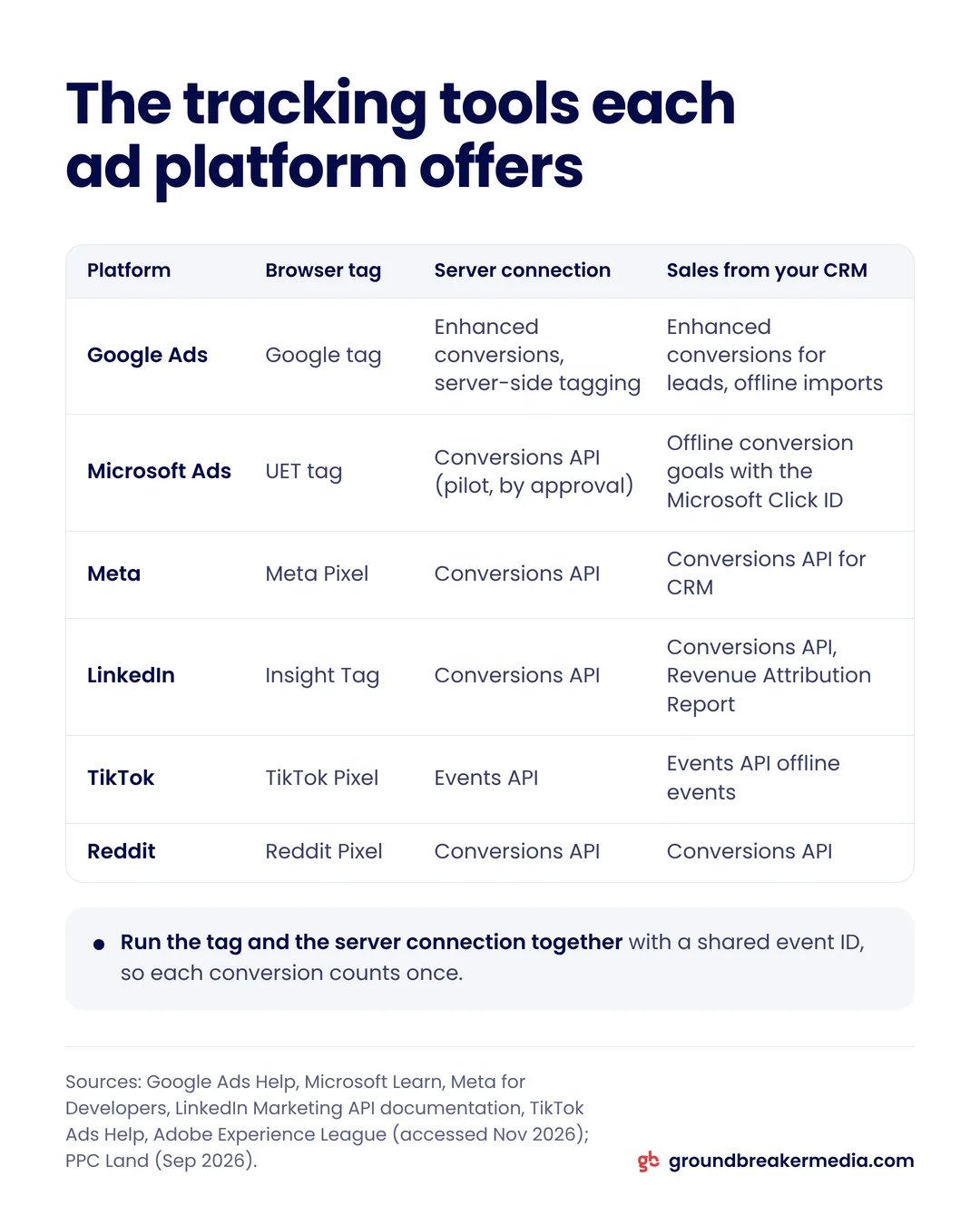
Conversion tracking records an action, such as a form fill, call or purchase, and tells the ad platform which ad led to it. Every major platform now offers two ways in: a tag that runs in the visitor’s browser and a server connection that sends events from your own systems.
A conversion is an action you have told a platform to count as a result. The browser tag (the Google tag, Microsoft’s UET tag, the Meta Pixel, the LinkedIn Insight Tag, the TikTok Pixel or the Reddit Pixel) fires when a visitor reaches a thank-you page or completes an event. The server connection sends the same events from your website’s server, your CRM or your store system, which keeps working when a browser blocks or shortens the life of the tag’s cookies.
The two routes work best together. Each platform matches a browser event and a server event that share an event ID and counts them once: Meta and TikTok deduplicate pairs that arrive within 48 hours of each other, Microsoft asks for the same eventId from its UET tag and its Conversions API, and LinkedIn keeps the Insight Tag event and drops the server copy (Meta for Developers; TikTok Ads Help; Microsoft Learn; LinkedIn Marketing API documentation). Microsoft’s Conversions API was still a pilot that Microsoft turns on account by account in September 2026, according to PPC Land.
Counting settings matter as much as the tag. Google advises counting lead actions once per ad interaction, so a refreshed thank-you page does not become a second lead (Google Ads Help). Keep page views, button clicks and video plays out of the primary conversions a campaign bids toward; they inflate the count and teach bidding to chase the wrong visitors.
Auto-tagging links each click to its conversion. Google Ads adds a Google Click ID (GCLID) to the landing page address, and Microsoft began switching on the Microsoft Click ID for eligible accounts in April 2024 (PPC Land). Keep both turned on: without them, a sale closed later in the CRM cannot be matched back to the click.
Browsers and consent rules decide how much of this reaches the platforms, a problem conversion tracking that survives privacy changes covers in full.
How should you tag links with UTM parameters?
Add utm_source, utm_medium and utm_campaign to every link you control outside Google Ads, so GA4 and your CRM can name the channel and campaign behind each visit.
UTM parameters are labels added to the end of a link that tell analytics tools where a visit came from. Google’s help on collecting campaign data with custom URLs says that "you should always use utm_source, utm_medium, and utm_campaign," and that missing parameters show up as "(not set)" in reports. GA4 also reads utm_id, utm_term, utm_content and utm_source_platform. Where a platform supports dynamic values, Google recommends them, because they fill in campaign and ad names automatically and remove typing errors.
Google Ads links need no UTM parameters when auto-tagging is on, since GA4 reads the click ID instead. Every other paid link does: Meta, LinkedIn, TikTok, Reddit and Microsoft ads, email campaigns, partner links and QR codes.
| Link | utm_source | utm_medium | utm_campaign |
|---|---|---|---|
| Meta ad | facebook or instagram | paid_social | spring_offer |
| LinkedIn ad | paid_social | b2b_webinar | |
| Monthly newsletter | newsletter | 2026_11 | |
| Flyer QR code | flyer | offline | open_house |
Three habits keep the data usable. Write every value in lowercase, because GA4 treats "Facebook" and "facebook" as two sources. Keep one shared sheet of approved values so that a new team member cannot invent "fb" next to "facebook". Never add UTM parameters to links between pages of your own site, because a tagged internal link starts a new session and overwrites the real source.
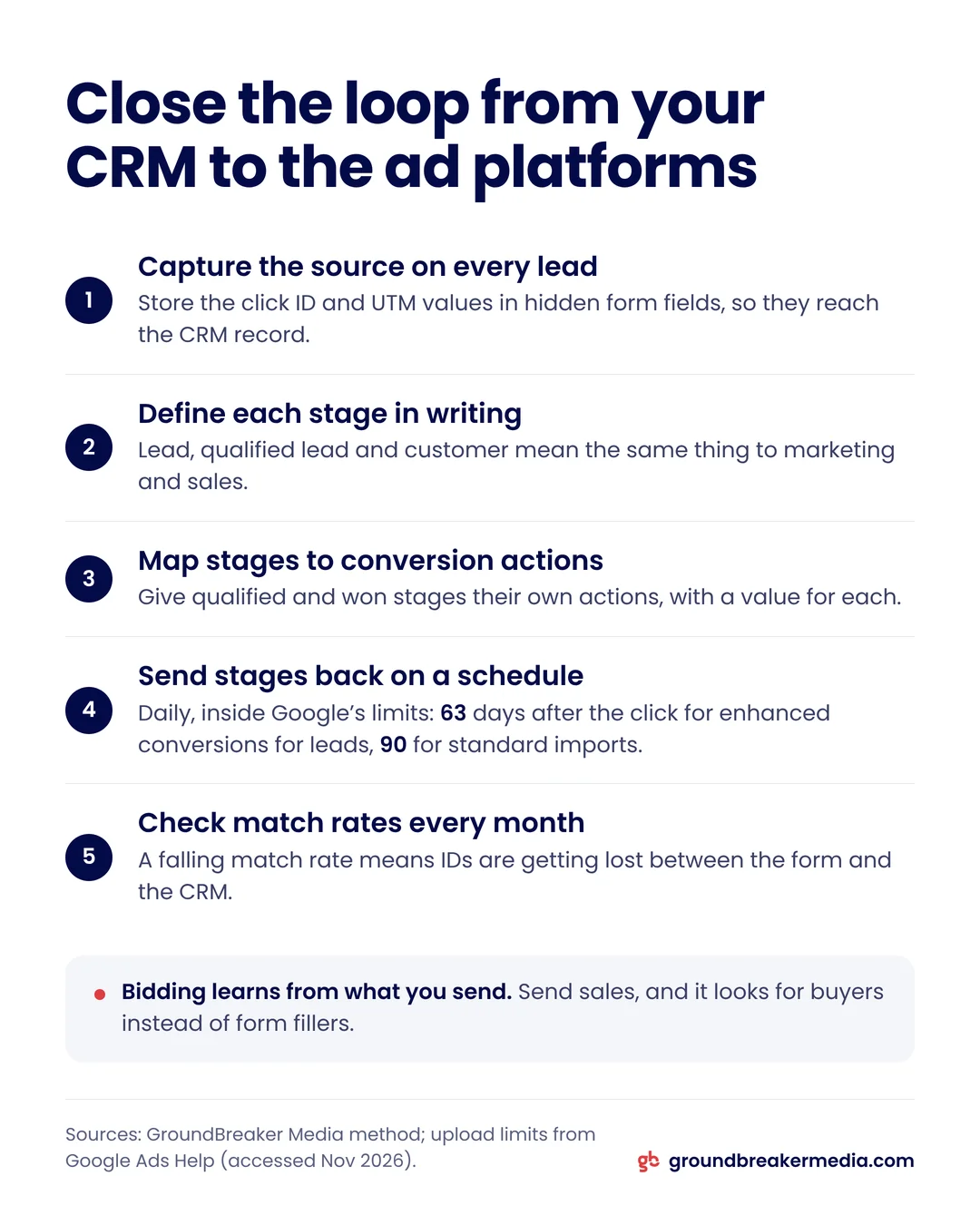
The last step happens in your forms. Hidden fields can store the UTM values and the click ID on each lead the moment it arrives, so the source travels with the lead into the CRM. The CRM guide for small businesses lists the fields every lead record should carry.
How do you track phone calls from ads?
Show a tracking number with the ad or on the landing page, so each call is tied to its source and counted only when it lasts long enough to be a real inquiry.
Google Ads can count calls from ads as conversions when they last longer than a minimum duration you choose, provided call reporting is turned on in the account (Google Ads Help). With call recording on, the same page says Google’s AI can analyze recordings to help identify the most valuable leads. Set the minimum duration from your own calls: long enough to exclude wrong numbers and hang-ups, short enough to keep quick bookings.
Calls to the number on your website need a different method. Call tracking software uses dynamic number insertion: a script swaps the phone number on the page for a tracking number tied to the visitor’s source, so a call can be credited to the ad, search or email that brought the caller. Look for a tool that passes the caller’s source and the click ID into your CRM, not one that only reports call counts in its own dashboard.
For many local service businesses, the phone carries more revenue than the form. Without call tracking, those calls arrive as unattributed leads, and every ad platform under-reports by the share of buyers who prefer to call.

How do privacy rules and browsers change what you can track?
They shorten how long a visit can be linked to a later sale and remove visitors who decline consent or block tags, so platforms under-count conversions even when sales hold steady.
Safari caps cookies created by scripts at seven days (WebKit, 2019), so a Safari visitor who clicks an ad and buys two weeks later can look like a new visitor. Firefox isolates cookies by site by default (Mozilla, 2022). Chrome still leaves the choice to users: in April 2025 Google said it would keep its current approach to third-party cookie choice (Google Privacy Sandbox).
Consent rules remove more. Google consent mode passes each visitor’s banner choice to Google tags through four signals, including two added for advertising, ad_user_data and ad_personalization (Google for Developers). Since early March 2024, Google has required those consent signals before visitors from the European Economic Area can join audiences for linked ad products or see personalized ads (Google Analytics Help). In advanced mode, tags send cookieless pings when consent is denied, and Google uses them to model some of the conversions it cannot observe.
Durable fixes move measurement onto data you collect: contact details captured on your own forms, server connections such as Meta’s Conversions API, Google’s enhanced conversions, and CRM outcomes sent back to each platform. Modeled conversions fill part of the gap, but they are estimates, so the CRM stays the record of what was sold. Conversion tracking that survives privacy changes compares each fix and explains how a consent banner should pass choices to every tag.
What is an attribution window, and how does it differ by platform?
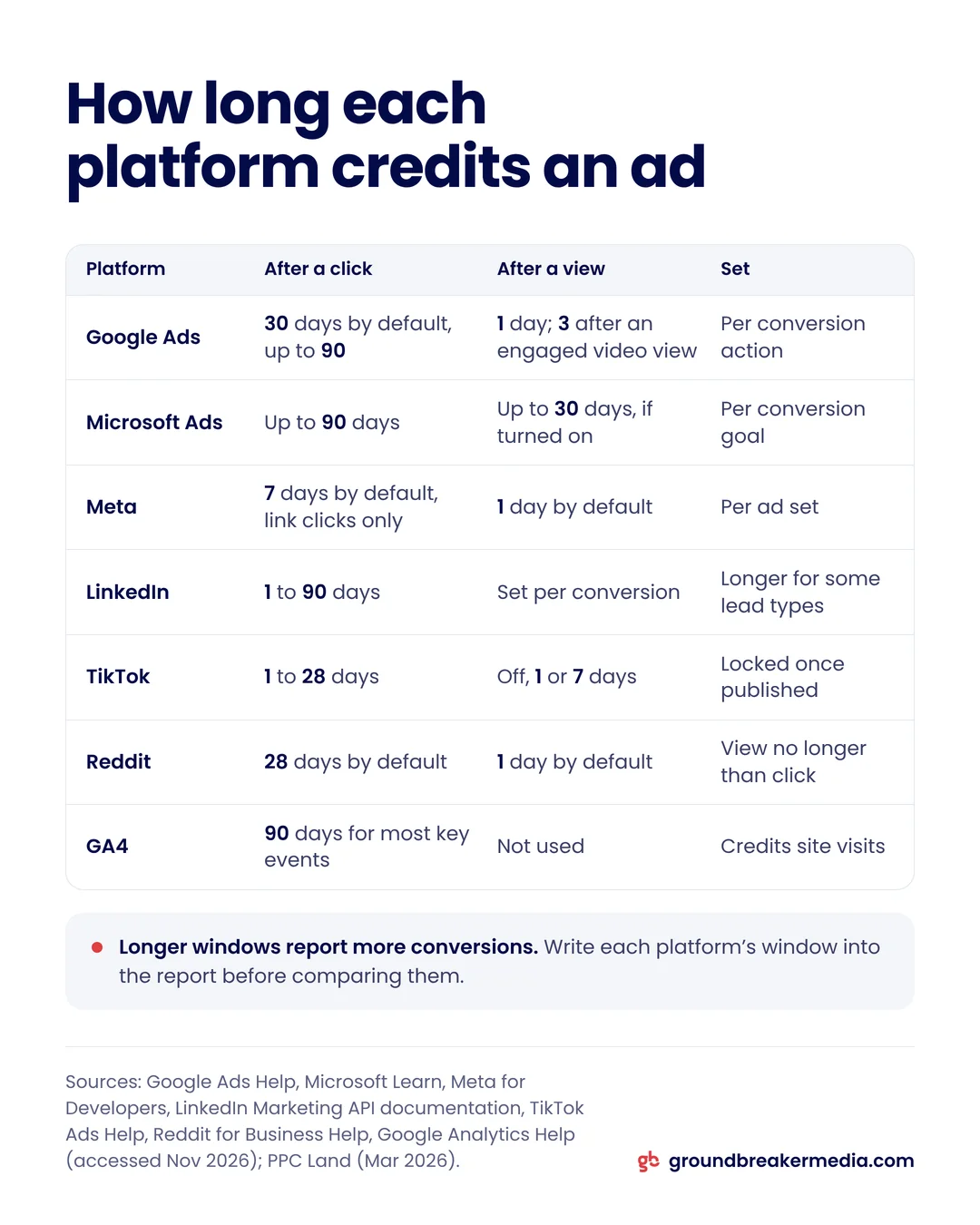
An attribution window is the time after an ad click or view during which a platform still credits that ad with a conversion. Each platform sets its own, so the same sale can fall inside one platform’s window and outside another’s.
Longer windows and credit for ad views both produce larger conversion counts. Google Ads credits clicks for 30 days by default, Reddit for 28 days and Meta for 7 days, while Meta, Reddit and Google also credit some conversions that follow a view without a click. In March 2026 Meta narrowed click-through credit to link clicks and moved conversions after shares, saves and similar actions into a separate engage-through category (PPC Land).
Two practical rules follow. Write each platform’s window into your report, so a reader knows why Meta’s count and Google’s count are not comparable. Change a window only at the start of a reporting period, because a longer window makes last quarter look worse by comparison without a single sale changing. Why your ad platform and your CRM disagree on revenue shows how windows, dates and counting rules combine.
Why do the ad platforms and your CRM report different numbers?
They measure different events and date them differently. Ad platforms count tracked actions such as form fills and calls, credited to their own ads inside their own windows. A CRM counts deals your team marks as won, once, on the day each one closes.
Dates are the quiet cause. Google Ads assigns a conversion to the day of the ad click (Google Ads Help), so a click in March that closes in May sits in March in Google Ads and in May in the CRM. The longer your sales cycle, the further the two months drift apart.
Overlap is the loud cause. Each platform sees only its own ads, so a buyer who touched a Meta ad and a Google ad inside both windows is claimed by both. A quick test shows the size of it: add last month’s conversions from every platform and compare the total with new leads in the CRM. If the platform total is higher, the gap is roughly the share of buyers that two or more platforms are claiming.
Google calls its own reporting "ad-centric" and says differences of "often up to 20%" between Google Ads and Google Analytics are normal (Google Ads Help). A gap that grows month after month is different: it usually means CRM outcomes are not reaching the platforms or a tag has broken. Why your ad platform and your CRM disagree on revenue walks through each cause and the fix.
Which attribution model should a small business use?
Use data-driven attribution inside Google Ads for bidding, use the source recorded in your CRM to give each channel credit, and take totals from CRM customers rather than from any model.
An attribution model is the rule or algorithm that decides how credit for a conversion is shared among the ads and channels a buyer touched. Google retired first click, linear, time decay and position-based models from Google Ads and GA4 in 2023 (Google Ads Help). Google Ads now offers data-driven and last click; GA4 offers data-driven, paid and organic last click, and Google paid channels last click (Google Analytics Help).
Multi-touch attribution, the idea of sharing credit across every touch rather than giving it all to one, now lives mostly in CRM reporting. HubSpot, for example, offers rules-based models such as linear, time decay and U-shaped in its attribution reports (HubSpot Knowledge Base). Those models are useful for comparing channels, but they still only see the touches your systems recorded: a referral from a friend or a conversation at a trade show is invisible to all of them.
Attribution divides credit for sales that happened. It cannot prove that an ad caused a sale. A test can: pause a campaign in one area or for a set period, keep it running elsewhere, and compare CRM leads. What a marketing dashboard should show explains each model, how data-driven attribution assigns credit and how to compare models in GA4.
How do you connect your CRM to Google Ads and Meta?
Store each lead’s click ID and source on its CRM record, then send qualified and won stages back to each platform, so bidding learns from sales instead of form fills.
Closed-loop tracking is the practice of sending each lead’s outcome from the CRM back to the ad platform that produced it. Without it, the platforms optimize toward whoever fills in forms most cheaply, which is rarely the same group as the people who buy.
Every major platform now accepts CRM outcomes:
- Google Ads recommends enhanced conversions for leads for new setups (Google Ads Help). Outcomes must be uploaded within 63 days of the last click for enhanced conversions for leads and within 90 days for standard offline imports, and imported conversions take about 3 hours to appear (Google Ads Help).
- Meta offers its Conversions API for CRM integration, which sends lead stages from the CRM to Meta.
- Microsoft Advertising imports offline conversion goals matched by the Microsoft Click ID (Microsoft Advertising Help).
- LinkedIn streams conversions from your server "regardless of where the conversion occurs" through its Conversions API (LinkedIn Marketing API documentation), and its Revenue Attribution Report connects CRM data to campaigns (Search Engine Land).
- TikTok accepts web, app and offline events, including CRM events, through its Events API (TikTok Ads Help).
Most CRMs connect to Google Ads and Meta through a built-in integration, Google Ads Data Manager or a connector tool, so the work is mostly decisions rather than code: which stages to send, what each stage is worth, and who checks the match rate each month. GroundBreaker Media builds and maintains this loop for clients under Revenue Infrastructure. The CRM guide for small businesses covers lead stages and the integrations by CRM.
What should a marketing dashboard show?
A marketing dashboard should show, on one screen, what each channel spent, what it produced in the CRM, which attribution model and date basis it uses, and when each source last refreshed.
The headline row repeats the numbers from the monthly report: spend, leads, qualified rate, customers, cost per customer and return, each against the previous period. Below it, a channel table splits the same figures by platform and campaign, and a stage funnel shows where leads stall. Add a short data note as well, stating the attribution model, whether conversions are dated by click or by close, and when each source last refreshed. Without it, two readers can look at the same chart and disagree about what it counts.
Google renamed Looker Studio to Data Studio in April 2026, and it connects natively to Google Ads, GA4, Search Console, Google Sheets and BigQuery, while data from Meta arrives through partner connectors (Google Cloud release notes; Google Cloud documentation). Anthropic’s Claude Sheets and Claude Data, launched on November 10, 2026, add another route for teams that already work in Claude, covered in what a marketing team can do with Claude Sheets, Whiteboards and Data.
Build the dashboard after the tracking works, not before. A clean dashboard on top of broken conversion data only makes wrong numbers look official. What a marketing dashboard should show lays out each panel and its data source.
How fresh is each data source, and when can you trust last month’s numbers?
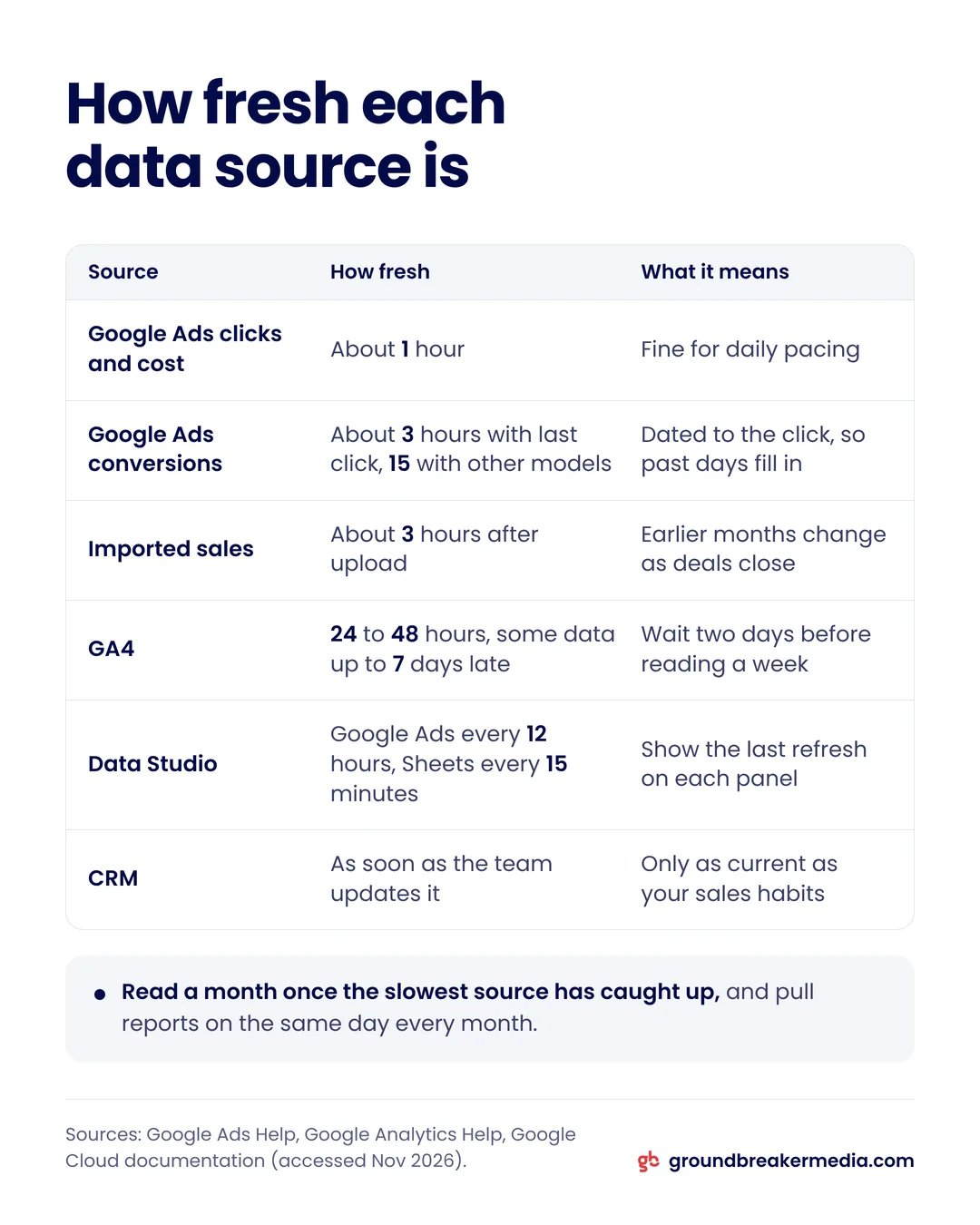
Each source fills in at its own pace: Google Ads conversions within hours, GA4 within one to two days, and imported sales over weeks as deals close. Read a month only after the slowest source you rely on has caught up.
Google says its clicks, impressions and cost refresh about every hour, while conversion data is ready about 3 hours after the event under last-click attribution and about 15 hours under other models (Google Ads Help). GA4 processing can take 24 to 48 hours, with some data arriving up to 7 days late (Google Analytics Help). Data Studio refreshes Google Ads data every 12 hours and Google Sheets every 15 minutes by default (Google Cloud documentation).
Because Google Ads dates each conversion to the click, last month keeps gaining conversions after it ends, and a sales cycle of several weeks stretches that tail. Pull reports on the same day each month, note when a past period was updated, and judge recent weeks with that lag in mind. Google Ads also offers "by conversion time" columns for figures that line up with a sales ledger, described in how to read a marketing report.
What tracking setup does a small business need at each stage?
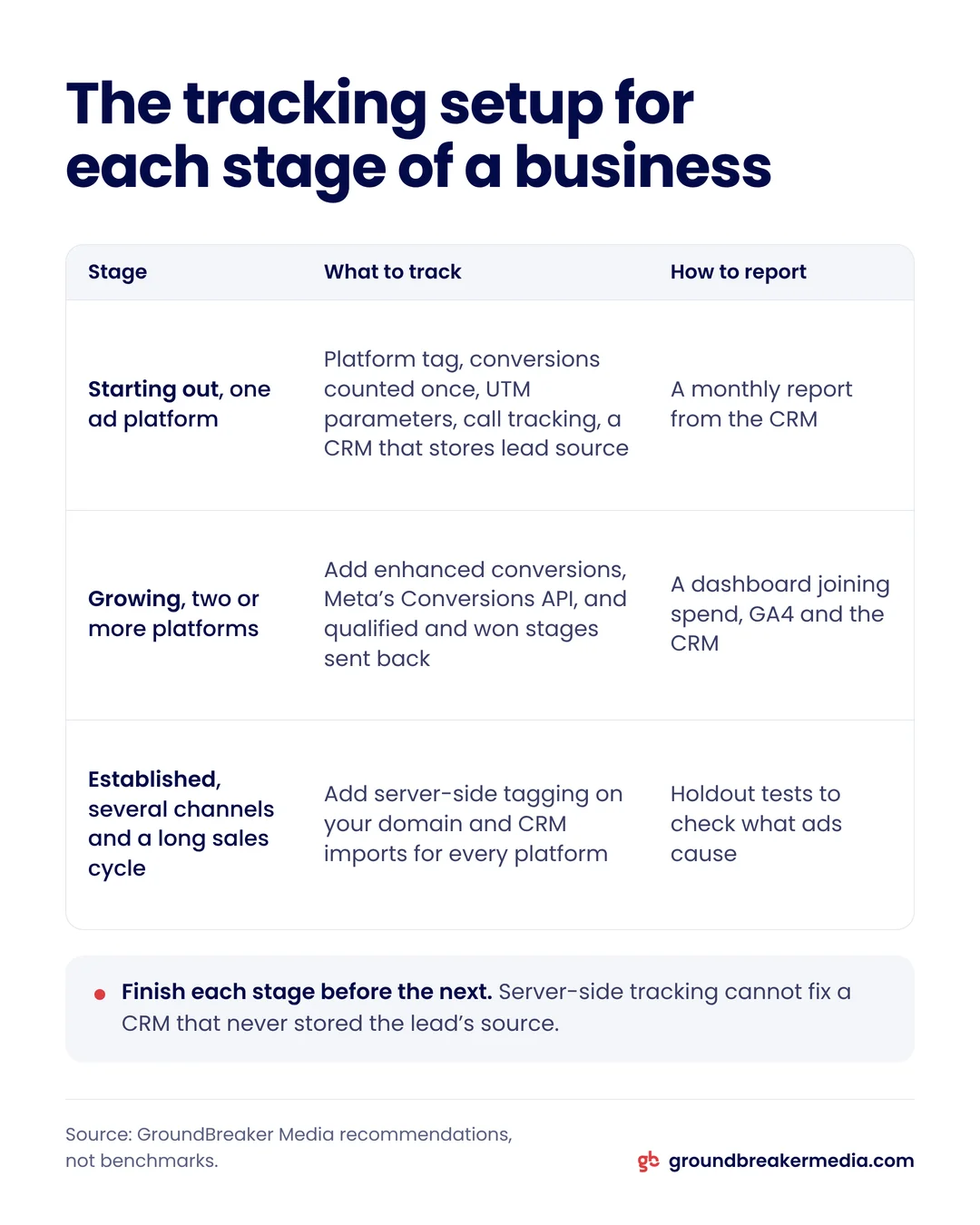
Start with tags, UTM parameters and a CRM that stores the source of every lead. Add server connections and CRM imports once spend is steady on two platforms, and add experiments when several channels compete for the same buyers.
The order matters more than the tools. A business that skips the first stage and buys a server-side setup still cannot say which leads became customers, because the CRM was never told where each lead came from. A business that completes the first stage can answer most questions with free tools.
Two signs say it is time for the next stage. The first is a second ad platform: once two platforms claim the same buyers, only CRM outcomes sent back to each one keep their bidding honest. The second is a sales cycle longer than a few weeks: the longer the gap between click and sale, the more conversions browsers and consent choices hide, and the more a server connection recovers.
How do you check that your tracking still works?
Test it after every site change and audit it monthly against the CRM. Tracking breaks quietly: a form plugin update, a new consent banner or a redesigned thank-you page can stop conversions without any error message.
A monthly check takes under an hour:
- Submit a test lead and place a test call, then confirm that each platform recorded them and that the CRM stored the source and click ID.
- Compare last month’s leads in each ad platform with the CRM leads that platform produced. A gap that grows month over month needs a cause.
- Check the share of new CRM leads that carry a click ID or UTM source. A falling share with steady sales points to a tracking problem, not a marketing one.
- Confirm that lead conversion actions still count once per interaction and that only real business actions are set as primary goals.
- Check that offline imports and server events uploaded without errors, and that their match rates have not dropped.
- Read the consent banner’s choices in each tag after any change to the banner or the site.
Write the results into the same document each month. A tracking log turns "the numbers look off" into a date and a cause.

Frequently asked questions
Is Google Analytics 4 enough to track marketing on its own?
No. GA4 records what visitors do on your website and which channel brought them, but it does not know which leads closed, what they paid or which calls turned into jobs unless you send that data in. Use GA4 for site behavior and channel trends, and the CRM for customers and revenue.
Do I need server-side tracking?
Not on day one. Start with platform tags, UTM parameters and a CRM that stores each lead’s source. Add server connections such as Meta’s Conversions API and Google’s enhanced conversions once you spend steadily on two platforms. Full server-side tagging on your own domain pays off later, when browser losses start to hide real sales.
What is the difference between marketing analytics and marketing reporting?
Marketing analytics is the whole system: tags, UTM parameters, the CRM, attribution and the analysis that explains results. Marketing reporting is the regular summary of those results for the people who decide budgets. Good reporting depends on good analytics, because a report can only be as accurate as the tracking behind it.
Can a small business track marketing without a CRM?
Yes, at low volume. A spreadsheet with one row per lead, its source, its status and the sale value can cover a few dozen leads a month. It breaks down when leads arrive faster than someone can log them, and it cannot send outcomes back to the ad platforms. Most businesses running paid ads on two platforms need a CRM.
Written by
GroundBreaker Media
A performance marketing agency that connects what you spend to what it brings back. About us
Related insights
All insights


Want one version of the truth? Start with a free audit.
Answer 10 quick questions and get a written audit within 2 business days: what your marketing is producing, what's holding it back, and what to fix first.