
Google Business Profile optimization: setup, fields and reviews
Google Business Profile optimization means a verified, accurate profile and a steady flow of genuine reviews, requested without incentives or gating.
 By GroundBreaker Media8 min read

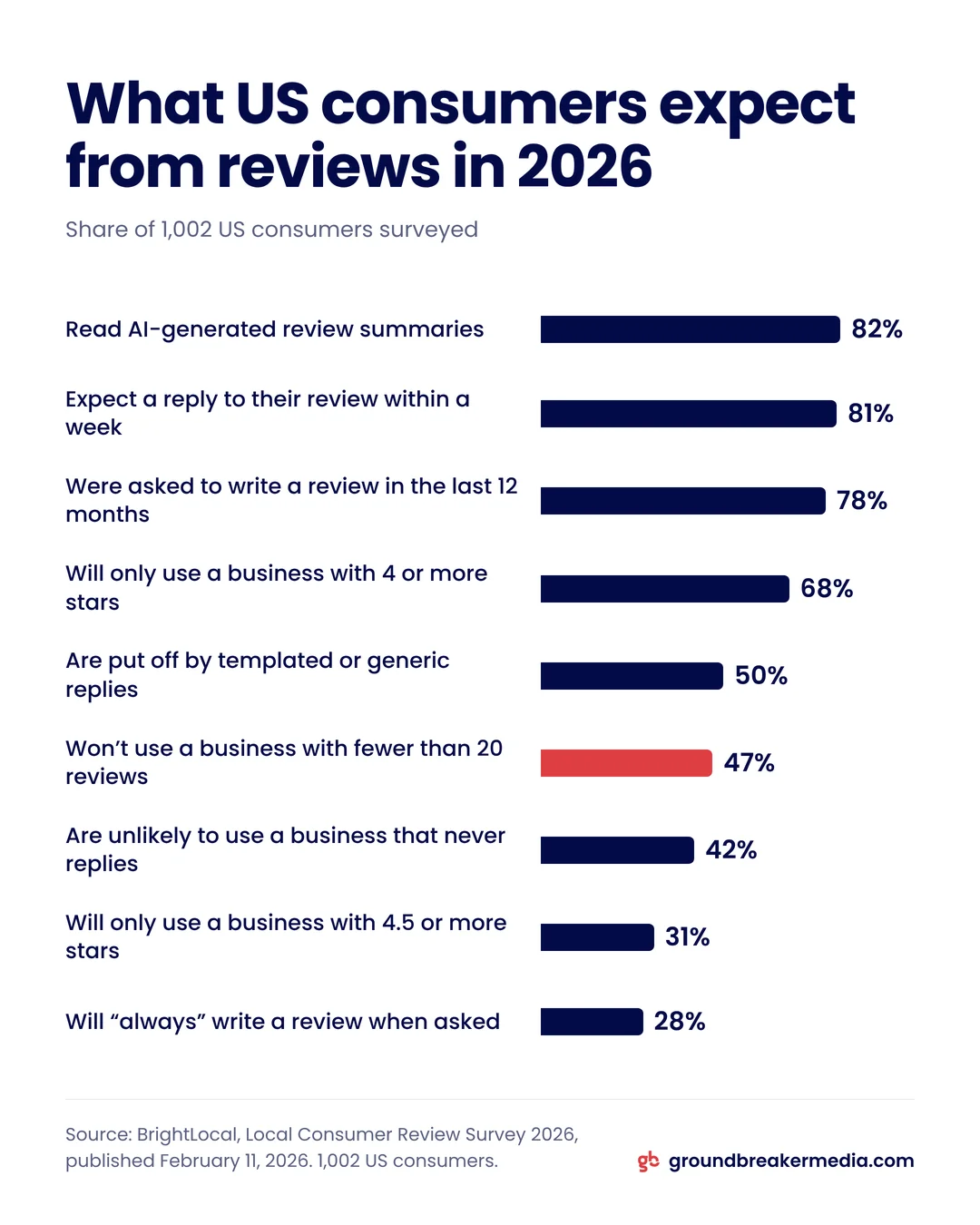
In BrightLocal’s 2026 survey, 47% of US consumers said they won’t use a business with fewer than 20 reviews. Google Business Profile optimization is how a local business clears that bar: a verified, complete and accurate profile, plus a steady flow of genuine reviews asked for without the incentives, selective requests or pressure Google prohibits.
What is Google Business Profile optimization?
A Google Business Profile is the listing that represents a business on Google Search and Google Maps, with its name, category, address or service area, hours, photos and reviews. Google Business Profile optimization is the work of getting that listing verified, filled in correctly and kept current, with new reviews arriving every month.
Google’s own local ranking tips name five actions: verify the business, keep its information up to date, respond to reviews, add photos and videos, and, for eligible retailers, add in-store products. How those actions feed Google’s relevance, distance and prominence factors is covered in the local SEO guide.
The profile also shapes whether a searcher calls. BrightLocal’s Local Consumer Review Survey 2026 of 1,002 US consumers found that 68% will only use a business with four or more stars, up from 55% in 2025, and 31% will only use one with 4.5 stars or more, up from 17%. The same survey found 82% read AI-generated review summaries, so the reviews on a profile now reach people through AI search as well.
How do you set up and verify a Google Business Profile?
Confirm the business is eligible, claim or create the listing, then complete whichever verification method Google offers. Google says a verified profile is more likely to appear in results.
- Check eligibility. Google’s guidelines for representing your business require "a physical location that customers can visit, or travels to customers where they are." P.O. boxes and virtual offices do not qualify, and a co-working office needs clear signage and staff.
- Claim before you create. Search for the business on Google Maps first. If a listing already exists, claim it, because the guidelines say "Do not create more than one page for each location of your business."
- Set a service area if you travel to customers. A service-area business is one that serves customers at their location, such as a plumber. Google says it "should hide your business address from customers," and the service area "shouldn’t extend farther than about 2 hours of driving time from where your business is based."
- Complete verification. According to Google’s verification page, "Verification methods are automatically determined by Google and can’t be changed." Options can include phone or text, email, a live video call, a recorded video and a postcard, and Google recommends video when a business is eligible.
- Record the video in one take. A verification video must last at least 30 seconds and be "an unedited, unique, and complete recording with no breaks." It should show the location, signage or tools, and proof you manage the business, such as an invoice in its name.
Which Google Business Profile fields matter most?
Name, primary category, hours, phone, website link and photos matter most, because they decide which searches the profile matches and what a searcher sees before calling. Each one has a Google rule worth reading before you edit.
| Field | Google’s rule | Common mistake |
|---|---|---|
| Business name | Must "reflect your business’s real-world name," with no taglines, phone numbers or service details | Adding a city or a service keyword |
| Primary category | The most specific fitting option, such as "Nail salon" rather than "Salon" | Choosing a broad category |
| Additional categories | "Use as few categories as possible," each completing "This business is a," not "has a" | One category per service |
| Hours | Regular customer-facing hours, plus special hours | Leaving holiday hours unchanged |
| Phone | A number that "connects to your individual business location," under the business’s direct control | A call center line or premium number |
| Website | A link to your own site, tagged with UTM parameters (our recommendation) | An untagged link that blends into other Google traffic |
| Photos | JPG or PNG, 10 KB to 5 MB, 720 by 720 pixels recommended | Stock images or heavy filters |
Sources: Google Business Profile Help, guidelines, categories and photos.
UTM parameters are tags added to a link so analytics can report where a visit came from, and Google Analytics says to "always use utm_source, utm_medium, and utm_campaign." We tag the profile’s website link with utm_source=google, utm_medium=organic and utm_campaign=business_profile, so profile visits stand apart from other Google search traffic.
For photos, Google says each image "should be in focus, well lit, and have no significant alterations or excessive use of filters or AI." Google also suggests photographing the business from each direction customers approach.
Anyone can suggest edits to a public listing. On April 16, 2026, Google said verified, active owners would get email alerts to review important edits before they publish.
The profile’s performance report shows the searches that found the business, views, calls, direction requests and website clicks. Read it next to your CRM, since a tap on the call button is not a booked job, and the CRM guide covers how to track the difference.
How do you get more Google reviews?
Ask every customer, soon after the work is done, with a direct link or QR code, and make the request a routine rather than a campaign. Asking is now normal: BrightLocal found 78% of consumers were asked for a review in the last 12 months, and 28% say they will "always" write one when asked, up from 16% in 2025.
Google provides the link. In the Business Profile, select Read reviews, then Get more reviews, and copy the link or save the QR code, which Google says can only be generated in a computer browser. Customers need a Google Account to post, and Google notes they can create one with a non-Gmail email address.
Build the request into moments that already happen:
- At handover: a printed QR code on the invoice, the receipt or a counter card.
- By message: the link in a same-day follow-up email, text or WhatsApp message.
- From the CRM: an automatic request to every customer whose job or deal moves to completed.
- In conversation: one mention from staff at the end of the visit, with no pressure and no target.
Review yield = new Google reviews ÷ review requests sent
Example (hypothetical numbers): a business that completes 80 jobs a month, asks every customer and sees a 15% review yield adds 12 reviews a month. Starting from zero, it passes 20 reviews in its second month.
Which review practices does Google prohibit?
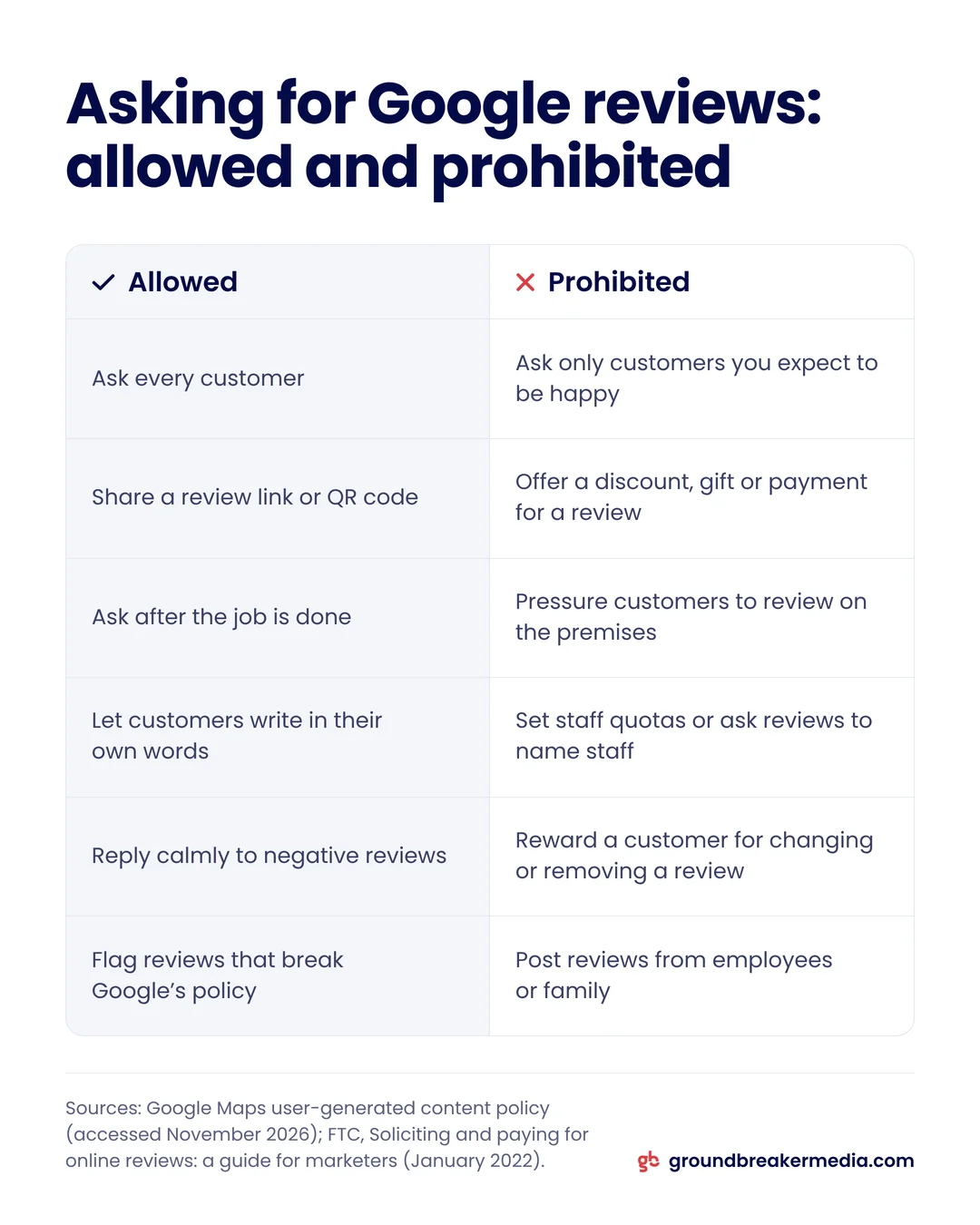
Google prohibits rewarding, filtering or pressuring customers for reviews, and since April 2026 it also bans staff review quotas and requests for reviews that name staff.
Review gating is screening customers first, usually with a private survey, and sending only the satisfied ones to the review site. Google’s Maps user-generated content policy bans it along with the practices below.
| Practice | What Google’s policy says |
|---|---|
| Discount, gift or payment for a review | Prohibited for posting any review or revision |
| Review gating | Merchants may not "selectively solicit positive reviews from customers" |
| Discouraging negative reviews | Merchants may not "discourage or prohibit negative reviews" |
| Reward for changing or removing a review | Prohibited as rating manipulation |
| Asking for a review on the spot | Merchants "should not require or pressure users" to review "while on the premises" |
| Staff quotas or reviews that name staff | Prohibited, added in April 2026 |
PPC Land spotted the staff clauses on April 17, 2026. What the policy permits is plain: asking for reviews that "represent a genuine experience, without offering incentives."
Google enforces this at scale. Its April 16, 2026 update says it blocked or removed over 292 million policy-violating reviews and removed over 13 million fake Business Profiles in 2025. A profile caught with fake engagement can be blocked from receiving new reviews, have its existing reviews unpublished for a set period, or show consumers a warning that fake reviews were removed.
US law points the same way. The Federal Trade Commission’s rule on consumer reviews and testimonials, effective October 21, 2024, bans buying reviews conditioned on their sentiment and suppressing negative reviews through threats or misrepresentation. The FTC’s guide for marketers adds: "Don’t ask for reviews only from customers you think will leave positive ones."
How should you reply to Google reviews?
Reply in a short, personal and professional way, starting with negative reviews and any review that asks a question, and never reveal private details about the customer. Google’s review tips, refreshed in January 2026 according to Search Engine Roundtable, set out the approach.
- Tone: "Be nice and stay professional," and "Be a friend, not a salesperson," with no deals or promotions in the reply.
- Length: "Keep it short and simple," address the reviewer by name and answer what they wrote, not a stock thank-you.
- Negative reviews: "Protect privacy and avoid personal attacks," check your records, "Be honest and explain limitations," and "Apologize if needed."
- Signature: Sign with your name or initials, and reply in a timely manner.
Speed matters to customers. BrightLocal found 19% expect a reply the same day, up from 6% in 2025, 32% by the next day and 81% within a week. Templated or generic replies put off 50% of consumers, and 42% are unlikely to use a business that never replies.
Every reply is public: Google says an approved reply "will be publicly posted under the customer’s review," and its review of a reply usually takes up to 10 minutes, though it can take up to 30 days. For a clinic, a law office or a financial adviser, even confirming that a reviewer is a client can disclose private information, so reply about the business and its process, not the person’s case.
GroundBreaker Media sets up review requests and reply workflows for clients under Search and AI Authority.
Frequently asked questions
How long does Google Business Profile verification take?
Up to 5 business days in most cases, according to Google, and occasionally longer. Some profiles verify instantly, for example through Search Console or bulk verification, and a postcard code typically arrives within 14 days. Google chooses which methods to offer based on the business type, public information, region and business hours.
Can I remove a bad Google review?
Not on your own. You can flag a review you believe breaks Google’s content policies, such as a fake review or one a competitor posted to damage your reputation, and Google removes content that violates them. An honest negative review stays up, so a calm reply explaining what changed is what the next reader will see.
Can employees leave reviews for my business?
They should not. Google’s policy prohibits reviews based on a conflict of interest, including current or former employment, and the FTC’s marketer guide says not to ask staff to write reviews. In Canada, the Competition Bureau said on January 18, 2024 that employees must disclose all connections to a business they promote in a review.
What happened to Q&A on Google Business Profiles?
Google has been replacing Maps Q&A with an AI-powered Ask option. In December 2025, a Google Product Specialist said in the Business Profile help forum that owners can still answer existing questions, according to Search Engine Roundtable, while searchers are pointed to the Ask button instead. Put clear answers to common questions on your website instead.
Written by
GroundBreaker Media
A performance marketing agency that connects what you spend to what it brings back. About us
Related insights
All insights


Want one version of the truth? Let's look at your numbers.
A short call, an honest read on what your marketing is producing, and clear next steps.