
How to claim your business in ChatGPT, and what Business Hub shows
Claim your business in ChatGPT in Business Hub: verify by DNS, email or phone, keep your details current and see mentions and clicks. Free at launch.
 By GroundBreaker Media7 min read

Since November 10, 2026, a business can claim its profile in ChatGPT through OpenAI’s Business Hub. You verify ownership with a DNS record, a business email or a code sent to the main phone number, then keep your details current and see how often ChatGPT mentions you. Claiming is free at launch and does not guarantee higher placement.
What is Businesses in ChatGPT?
Businesses in ChatGPT is an OpenAI program, launched in beta on November 10, 2026, that lets a company manage how it appears inside ChatGPT. It has two parts. Business Hub is the dashboard where a verified owner claims a profile, edits its details and reads aggregated insights. Business Agents are branded assistants that answer questions about a company’s own products, in conversations that are labeled and kept apart from ChatGPT’s independent answers (OpenAI, November 2026).
Until now, a business had no direct way to correct what ChatGPT said about it. The assistant built its answers from your website, reviews and other sources across the web, which our guide to AI search explains. Business Hub does not replace those sources. It adds one place where you state the facts yourself and see part of the result.

Why does a business profile in ChatGPT matter?
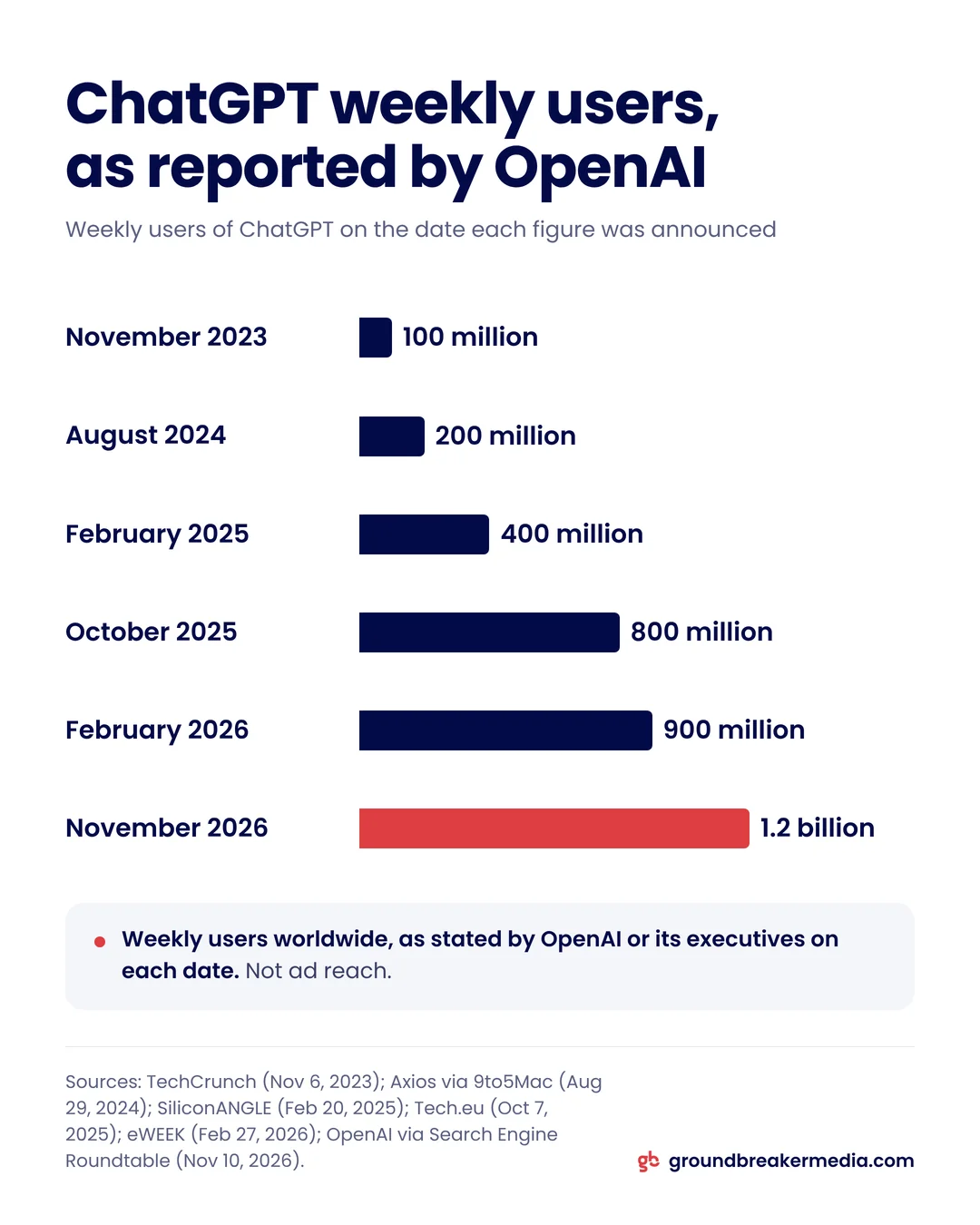
ChatGPT now reaches an audience on the scale of a search engine. When OpenAI announced Businesses in ChatGPT, it described its audience as 1.2 billion people who use ChatGPT each week, up from 100 million weekly users in November 2023 (Search Engine Roundtable, November 2026; TechCrunch, November 2023).
Weekly users are not buyers, and OpenAI does not publish how many conversations involve choosing a business. The figure still matters for one reason: more of your future customers will hear about you from an assistant before they reach your website. If the assistant has your services, hours or service area wrong, nobody tells you, and the customer you lost never appears in your analytics.
Who can claim a business in ChatGPT?
The owner or an authorized representative of an eligible business can claim it. Eligibility depends on the type of business, where it operates and whether it can be verified, and OpenAI starts with businesses that have their own website (XenoSpectrum, November 2026).
| Type of business | What you can do at launch |
|---|---|
| Online business with its own website | Claim a profile where ChatGPT is available |
| Local store or restaurant | Claim an existing listing, in the United States only |
| US ecommerce or online service business | Claim a profile and apply to publish a Business Agent |
| Enterprise customer or ChatGPT advertiser | Claim through an OpenAI representative |
| Brand with several locations | Claim each location separately |
OpenAI can also decline businesses in categories it has put on hold (Delta V Digital, November 2026). A consultancy in Canada that books clients through its website, for example, fits the first row: it can claim a profile today, but it cannot publish a Business Agent yet.
How do you claim your business in ChatGPT?
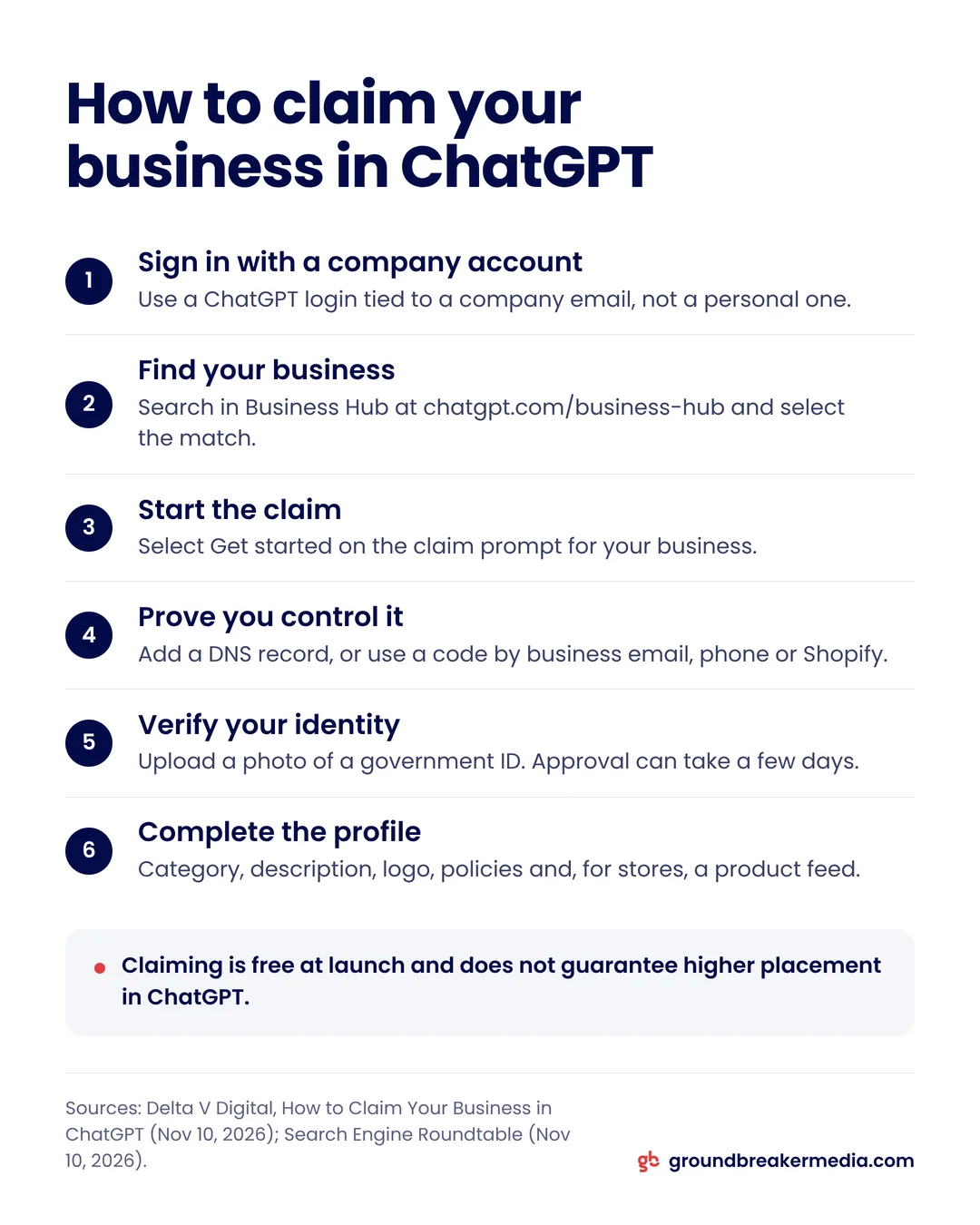
You claim your business in ChatGPT in six steps, all from Business Hub at chatgpt.com/business-hub (Delta V Digital, November 2026; Search Engine Roundtable, November 2026).
- Sign in with a company account. Use a ChatGPT account tied to a company email, so access stays with the business when people change roles.
- Find your business. Search for it in Business Hub and select the match. An eligible online business that is missing may see an option to add itself.
- Start the claim. Select Get started on the claim prompt for your business.
- Prove you control it. Choose a method: a TXT record in your domain’s DNS, a code sent to the business email, a code by text or automated call to the main business number, or a Shopify connection.
- Verify your identity. The person claiming uploads a photo of a government ID, and approval can take a few days.
- Complete the profile. Add your category, description, logo, cover photo, policies and, for stores, a product feed.
DNS verification suits a business without a staffed phone line. The record value starts with openai-business-claim=, it can take from minutes to several hours to propagate, and an unconfirmed record expires (Delta V Digital, November 2026). Search Engine Roundtable’s editor used DNS on launch day and saw the claim move to pending review.
What can you change after you claim your business?
After verification you control the profile fields ChatGPT shows for your business: website, description, category, logo and cover photo, delivery and return policies, and a product feed with current prices and availability, uploaded as CSV or JSONL or synced from a Shopify catalog (Delta V Digital, November 2026; OpenAI, November 2026).
Two limits apply. OpenAI reviews changes before they go live, so an edit is not instant. And a verified profile does not give you control over everything ChatGPT says about you: OpenAI’s terms state that updating your information does not make it the only information about your business (XenoSpectrum, November 2026). Write the description from the same facts as your website and your Google Business Profile, because an assistant that finds three versions of your hours has to pick one.

What do Business Hub insights show?
Business Hub insights show four aggregated measures: mentions, profile views, website clicks and discovery topics (Delta V Digital, November 2026; Search Engine Roundtable, November 2026).
- Mentions: for an online business, how many times ChatGPT referenced your website. Your brand name on its own does not count. For a local business, how many times a result for your location appeared.
- Profile views: how often people opened your profile.
- Website clicks: recorded clicks on links to your site. OpenAI’s own help text says clicks "don’t confirm website visits or conversions."
- Discovery topics: common themes across the conversations that cited your website.
Each measure appears only after activity passes a reporting threshold, so an empty field means too little data, not zero. OpenAI does not share individual prompts or chats with businesses (OpenAI, November 2026).
Click rate from ChatGPT = website clicks divided by mentions, for the same date range.
Treat clicks as the top of the funnel. To learn what those visits are worth, tag them in your analytics and follow them into your CRM, the same way you would follow any ad platform; closed-loop tracking covers how.
Does claiming your business make ChatGPT mention it more?
No. OpenAI states that claiming does not guarantee higher placement or sales, and a verified badge only shows that a business passed verification, not that OpenAI vouches for its products (Delta V Digital, November 2026; XenoSpectrum, November 2026). Digiday reported that OpenAI’s Benji Shomair said claiming should not change how often a business appears (Relevant Audience, November 2026).
What can change is accuracy. When your category, services and service area are current, ChatGPT has better material for the questions where you are a real fit. How often you are mentioned still depends on the same signals as before: your site, your reviews, consistent details across the web and pages that answer the questions buyers ask.
What are ChatGPT Business Agents?
A Business Agent is an assistant a company sets up inside ChatGPT to answer questions about its own offerings, built only from the business’s instructions and product feed. At launch, Business Agents are limited to eligible ecommerce and online service businesses in the United States (OpenAI, November 2026).
Agent conversations are labeled and kept apart from ChatGPT’s own answers. Publishing one takes a separate eligibility review, and OpenAI’s Business Agents Policy bars agents from inventing offers or pressuring users. A business can also sponsor its agent as the destination for ChatGPT Ads, which requires a separate advertising agreement (Relevant Audience, November 2026; XenoSpectrum, November 2026).
Should you claim your business in ChatGPT now?
Yes, if your business qualifies. Claiming is free at launch, and Digiday reported that OpenAI did not rule out charging later. An unclaimed profile is also one someone else can try to claim; Business Hub has a Dispute ownership option for that case, but it is easier to hold the profile from the start.
We recommend three things with the claim: use a company-owned ChatGPT account, verify through DNS if no one answers the main phone line, and write the profile from the same facts as your website and Google Business Profile. Then read the insights once a month, the way you would read any new channel: mentions and clicks first, then whether the clicks turn into leads.
Claiming and maintaining these profiles is part of the AI search visibility work in GroundBreaker Media’s Search and AI Authority service.
Frequently asked questions
Does it cost anything to claim a business in ChatGPT?
No, not at launch. Claiming a profile in Business Hub and building a Business Agent were both free when OpenAI introduced them in November 2026, according to Digiday’s reporting. OpenAI did not rule out charging later. Sponsored placements that send ChatGPT Ads to a Business Agent are a paid product under a separate advertising agreement.
Can a business outside the United States claim a ChatGPT profile?
Yes, if it is an online business with its own website in a country where ChatGPT is available. Claiming an existing local storefront listing was limited to the United States at launch, and Business Agents start with US ecommerce and online service businesses. OpenAI has not published a country list or a timeline for wider access.
How long does ChatGPT business verification take?
Domain verification can finish the same day, since a DNS record usually propagates within minutes to a few hours. The identity check that follows can take a few days, and its status appears in your organization settings. If verification fails, check that the TXT record sits on the right host and has not expired.
Does ChatGPT Business Hub replace a Google Business Profile?
No. The two cover different places where people look for a business: Google Business Profile feeds Google Search and Maps, while Business Hub covers ChatGPT. Keep both, with the same name, category, hours and services, so neither one contradicts the other and both assistants and search engines read the same facts.
Written by
GroundBreaker Media
A performance marketing agency that connects what you spend to what it brings back. About us
Related insights
All insights


Want one version of the truth? Let's look at your numbers.
A short call, an honest read on what your marketing is producing, and clear next steps.