
CRM for small business: how to choose one and what to track
A CRM for small business should save each lead's ad source, move it through written stages to a sale and send those stages back to Google Ads and Meta.
 By GroundBreaker Media8 min read

A spreadsheet can count last month’s leads. A CRM for small business should also show which ad produced each paying customer. Choose one that saves the click ID and source on every lead, moves leads through written stages to a sale, and sends those stages back to Google Ads and Meta. Price and extra features come second.
What does a CRM for small business need to do?
It needs to keep every lead in one record, show where it came from, track what happened next and report the result without anyone rebuilding a spreadsheet.
A CRM (customer relationship management system) is software that stores each contact, lead and deal in one shared record, with its source, history and current stage. Lead tracking software is the narrower version: it records where each lead came from and what happened to it, a job most CRMs include.
For a business that pays for ads, three jobs separate a useful CRM from an address book:
- Capture: save the ad click ID, UTM parameters and landing page the moment a form, call or chat arrives.
- Stage: move each lead through stages with written entry rules, so sales and the reports agree on what each stage means.
- Return: send stage changes back to Google Ads and Meta, so their bidding learns which leads bought.
Contact lists, email templates and reminders are standard. These three jobs are where CRMs differ for an advertiser.
Which lead stages should you track from ad to sale?
Track six stages, each with a written rule for entering it: new lead, qualified, appointment, proposal, customer and lost.
| Stage | Enters when | Moved by | Send to Google Ads and Meta |
|---|---|---|---|
| New lead | A form, call or chat arrives with contact details | The CRM, automatically | Yes, as the base event |
| Qualified | The lead passes your written qualification rule | Sales | Yes, often the bidding target |
| Appointment | A call, visit or consultation is booked | Sales | Optional |
| Proposal | A quote with a value is sent | Sales | Optional, with the value |
| Customer | The deal is marked won | Sales | Yes, with revenue |
| Lost | The deal closes without a sale | Sales, with a reason | No |
Software defaults run longer. HubSpot’s lifecycle stages (updated October 20, 2026) run subscriber, lead, marketing qualified lead, sales qualified lead, opportunity, customer and evangelist, and its default deal pipeline adds seven deal stages. A small team rarely qualifies a lead twice, in marketing and again in sales, so one qualified stage is usually enough.
HubSpot’s default lifecycle stage also only moves forward when forms, imports or workflows update it, so a lead that goes cold keeps its stage until someone marks it lost with a reason. Give each stage a date field, so you can see how long leads wait.
Stage conversion rate = leads that reach the next stage ÷ leads that entered the current stage
Work it out monthly for each step. The step where the rate drops is the first place to look, before anyone touches the ads.
Which fields should every lead record carry?
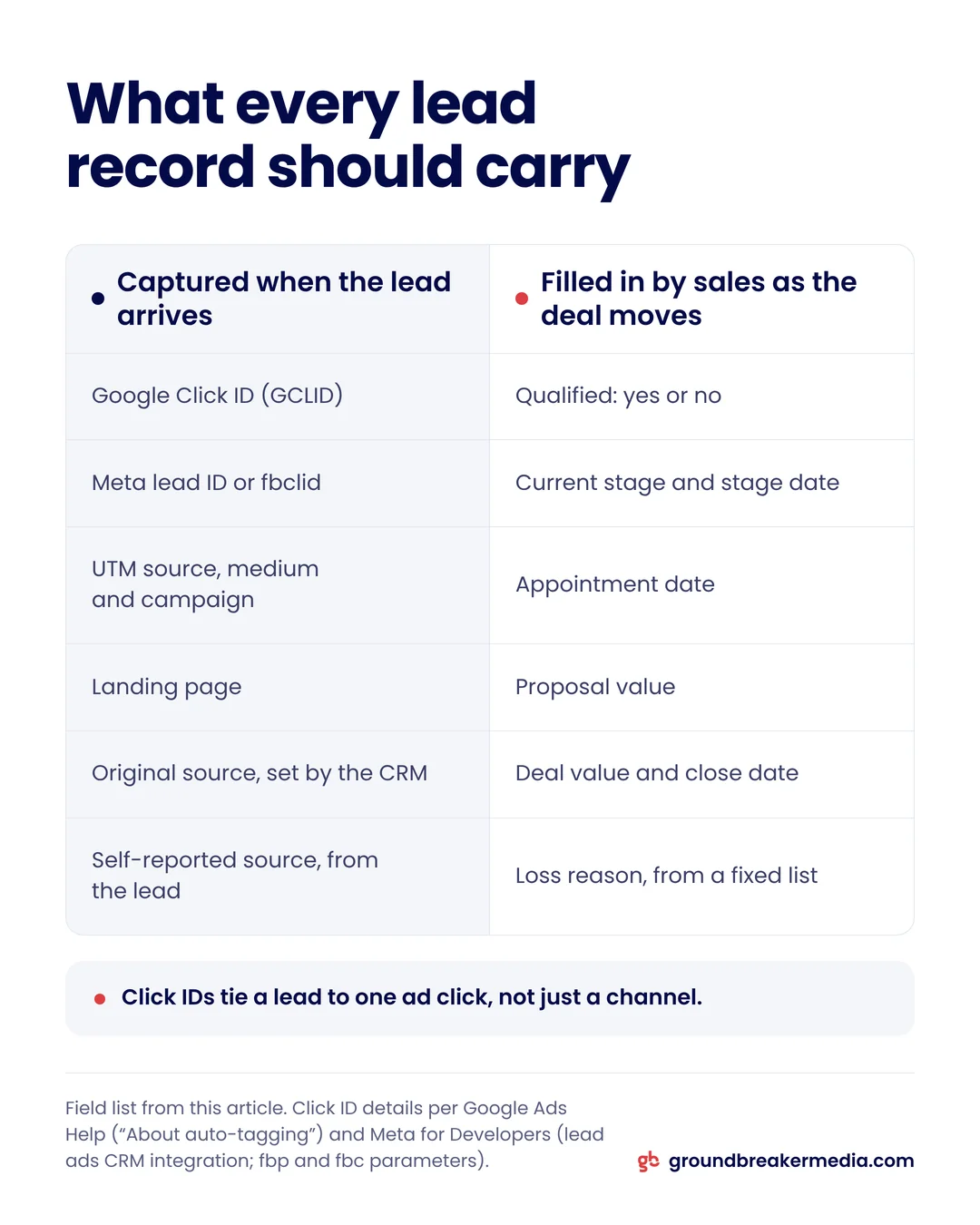
Source fields should fill in automatically when the lead arrives, and sales fields should be completed by people as the deal moves.
| Field | What it holds | Filled by |
|---|---|---|
| Google Click ID (GCLID) | The ID Google Ads adds to the landing page URL | Hidden form field |
| Meta lead ID | The 15 to 17 digit ID on each lead ad submission | Meta lead ads integration |
| Meta click ID (fbclid) | The ID Meta adds to site visits from its ads | Hidden form field |
| UTM source, medium and campaign | The source as tagged in the ad URL | Hidden form fields |
| Landing page | The first page the lead saw | CRM tracking code |
| Original source | The first known channel | The CRM |
| Self-reported source | The answer to "How did you hear about us?" | The lead |
| Stage and stage date | Current stage and when it was reached | Sales or automation |
| Loss reason | Why the lead did not buy | Sales, from a fixed list |
| Deal value and close date | Revenue and the day the deal was won | Sales |
The click IDs matter most, because they tie a lead to one ad click rather than to a channel. Google’s auto-tagging adds the GCLID to your URLs, and Google says it "is also required for businesses that want to track offline conversions." Meta asks CRM integrators to keep the 15 to 17 digit Meta Lead ID in downloaded lead data, and describes fbclid as a parameter passed with the URL when someone clicks a Facebook or Instagram ad. Google’s URL builder guidance says to always use utm_source, utm_medium and utm_campaign.
HubSpot’s traffic source properties set the first and latest known source automatically, though HubSpot notes that ad blockers can block its tracking cookies. The self-reported field covers what tracking misses, such as a referral from a friend, and a fixed list of loss reasons keeps "price" from being spelled four ways.
Setting up CRM fields and stages like these is part of what GroundBreaker Media covers under Revenue Infrastructure.
How do HubSpot, Zoho CRM, Pipedrive and Salesforce compare on price?
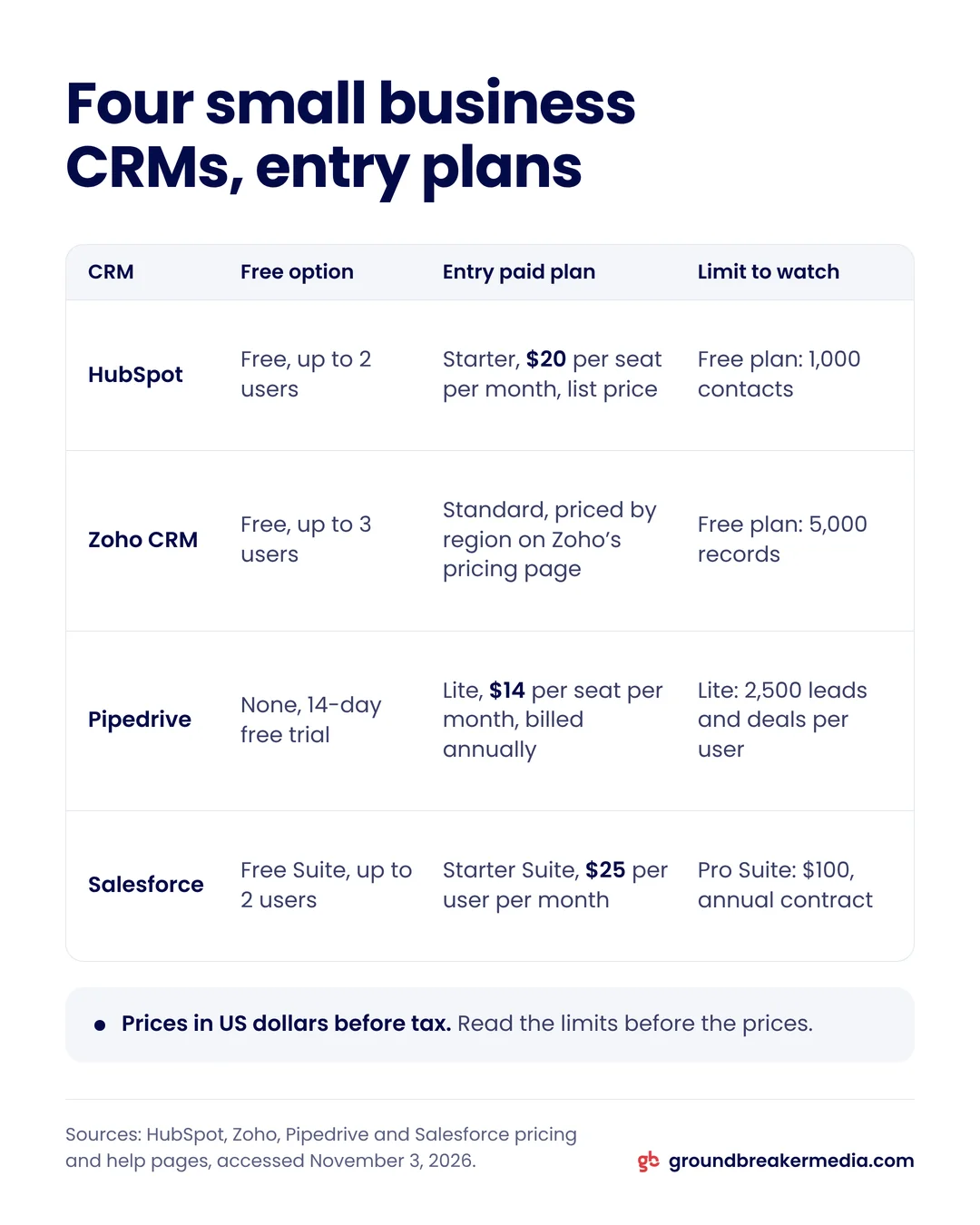
Three of the four have a free option, and the entry paid plans with a US list price run from $14 to $25 per user per month, but the limits differ more than the prices.
| CRM | Free option | Entry paid plan | Limits worth knowing |
|---|---|---|---|
| HubSpot | Up to 2 users | Starter: $20 per seat per month, list price | Free: 1,000 contacts, default pipeline only. Starter: 15 pipelines |
| Zoho CRM | Up to 3 users | Standard: price set by region on Zoho’s pricing page | Free: 5,000 records. Standard: 100,000 records, 5 pipelines |
| Pipedrive | None; 14-day trial | Lite: $14 per seat per month, billed annually | Lite: 2,500 leads and deals per user |
| Salesforce | Free Suite, up to 2 users | Starter Suite: $25 per user per month | Starter Suite: no user maximum |
Sources: HubSpot, Zoho, Pipedrive and Salesforce pricing pages plus the help pages listed under Sources, accessed November 3, 2026. Prices in US dollars before tax.
Read the limits before the prices. At 100 leads a month, a business fills HubSpot’s 1,000 free contacts in under a year. HubSpot offers new customers $7 per seat paid annually or $10 monthly for a limited time, so budget from the $20 list price. Pipedrive’s higher plans cost $39, $59 and $79 per seat per month billed annually, and Salesforce’s Pro Suite costs $100 per user per month on an annual contract.
How do you connect a CRM to Google Ads and Meta?
Connect in three layers: capture click IDs on every lead, link the CRM to each ad account, then choose which stage changes to send back as conversions.
Google Ads Data manager lists direct connections for HubSpot, Salesforce and Zoho CRM, among other data sources. Pipedrive is not on that list, so its data has to reach Google Ads another way, such as a file upload or a third-party connector. Google’s HubSpot connection page calls offline conversion import "a legacy feature" and recommends enhanced conversions for leads, which the guide to tracking through privacy changes explains.
HubSpot’s Google Ads integration works at two levels. Connecting a Google Ads account is available on all HubSpot plans, and HubSpot attributes contacts to ads through tracking parameters on ad URLs, counting only clicks after auto-tracking is turned on. Sending stages back takes ad conversion events: up to 5 on Marketing Hub Starter, 50 on Professional and 100 on Enterprise. They sync lifecycle stage changes through Google’s enhanced conversions, hashed with SHA-256, and count only changes made after the event exists.
Meta follows the same pattern with tighter rules. HubSpot syncs lifecycle stage changes to Meta through the Conversions API, but only for contacts from lead generation campaigns using the Conversion Leads goal. Meta’s CRM integration guide asks for at least 200 leads a month, an optimized stage with a conversion rate between 1% and 40%, daily uploads, and a stage reached within 28 days of the lead.
Those thresholds decide which stage to send. Qualified often meets them when customer does not, because it happens sooner and more often. Working out a cost per lead target covers the stage Google Ads should optimize toward, and the article on closing the loop with ad platforms shows how imported outcomes reach bidding.
Which CRM should a small business start with?
Start with a CRM your team will keep current and that connects directly to the ad platforms you buy.
We recommend HubSpot’s free CRM as the standard starting point for a small business that has none: it covers capture and stages at no cost, connects to Google Ads on every plan, and is one upgrade away from sending stages back to Google Ads and Meta. Move up when you pass two users or 1,000 contacts, or when you want those stages sent.
The others fit specific cases:
- Zoho CRM gives three free users and 5,000 records, with a direct Data manager connection.
- Pipedrive suits a sales team that lives in the pipeline view and can build its own route to Google Ads.
- Salesforce Starter Suite has no user maximum and a direct Data manager connection.
Switching later means mapping every old lead to new fields and stages, so choose carefully now. Once sources and stages are clean, a marketing dashboard can put them next to ad spend.
How do you keep CRM data clean enough to trust?
Make source fields automatic, make sales fields required at each stage change, and give one person a weekly check.
- Require a deal value and close date before a deal can be marked won.
- Use pick lists, not free text, for qualification and loss reasons.
- Review leads that have sat in one stage for more than two weeks.
- Merge duplicates, so a lead who fills in two forms counts once.
- Keep stage definitions in one shared document, changed only with a dated note.
A weekly check catches errors while the person who made them still remembers the lead.
Frequently asked questions
Is a spreadsheet enough to track leads from ads?
For a handful of leads a month, yes, if every row carries the source, click ID, stage and outcome. It breaks down when two people edit it, when leads arrive by phone and chat as well as forms, or when you want stages sent back to Google Ads and Meta automatically. Then it is time for a CRM.
Is HubSpot’s free CRM really free?
Yes, within limits. HubSpot’s pricing page, accessed November 3, 2026, lists the free CRM for up to 2 users and 1,000 contacts, with 10 dashboards and the default deal pipeline only. Connecting a Google Ads account is included, but ad conversion events, which send stages back to Google Ads and Meta, start with Marketing Hub Starter.
What is the difference between a lifecycle stage and a deal stage?
A lifecycle stage describes the person, such as lead, qualified or customer. A deal stage describes one sale, such as proposal sent or closed won. In HubSpot, a contact becomes an opportunity once it is associated with a deal, and a customer after at least one closed deal. HubSpot’s ad conversion events sync lifecycle stage changes.
Why store the Google Click ID if the CRM already records the source?
The source names a channel, while the Google Click ID ties the lead to one specific ad click. Google’s enhanced conversions for leads guidance says to include GCLIDs with uploaded events whenever possible, and requires them when no tag collects customer data on your site. Auto-tagging adds the ID to the URL, and a hidden form field saves it.
Written by
GroundBreaker Media
A performance marketing agency that connects what you spend to what it brings back. About us
Related insights
All insights


Want one version of the truth? Let's look at your numbers.
A short call, an honest read on what your marketing is producing, and clear next steps.